A custom Hyprland + Quickshell desktop for Arch Linux. Wallpaper-driven theming, a built-in theme marketplace, live desktop lyrics, per-theme lock screens, and a control center — all hand-written, no matugen, no auto-theming.
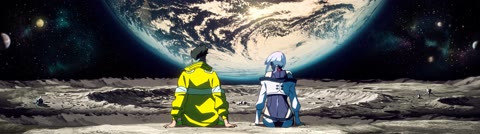


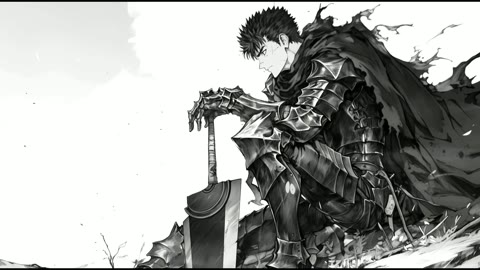
- Themes are whole worlds, not just colors. Each ships its own bar, clock, audio visualizer, lyrics, lock screen, notifications, and control-center chrome — swap the wallpaper and the entire desktop re-skins to match. Video wallpapers supported.
- The theme reaches Frostify too. Frostify —
the full-screen now-playing overlay (
Super+S) — follows the active theme live: each theme ships afrostify.qmlslot that reskins the overlay's card, backdrop, and type to match the wallpaper and palette, with per-theme track-change effects. Switch themes and the music app changes with everything else; it's a separate install but part of the same visual system. - A theme marketplace, in the shell.
Super+/→ Marketplace: browse every theme, see a preview + size, and download one into place with a click. No git, no manual copying. - Vernissage theme switcher (
Super+Shift+T) — a gallery rail of your installed themes with live video previews; Enter to apply. - Live desktop lyrics synced to whatever's playing (LRCLIB + AMLL), per-theme styling.
- Control center (
Super+M), launcher (Super+R), clipboard history (Super+V), a keybind cheat-sheet + settings sheet (Super+/), captive-portal detection, and more. - Two-machine portable — the same config boots a desktop and a laptop; per-machine bits live in untracked local files.
Arch Linux with Hyprland. Everything else (quickshell, awww, pipewire, fonts, …) is in
packages.txt and the installer handles it.
GPU: install your graphics driver as part of the base Arch setup — nvidia-open-dkms
(NVIDIA), mesa + vulkan-radeon (AMD), or mesa + vulkan-intel (Intel). The rice
itself is vendor-agnostic: the installer detects your GPU and writes the right
LIBVA_DRIVER_NAME into ~/.config/hypr/local.conf so the video wallpapers get hardware
decode on any of the three. It never touches drivers, the kernel, or the bootloader.
git clone https://github.com/AidanMercer/world80 ~/dotfiles
~/dotfiles/install.sh
The installer is guided — it asks before each step and backs up anything it would replace:
- installs the packages from
packages.txt(pacman + paru) - symlinks the configs into
~/.config - writes per-machine templates (
monitors.conf,local.conf) - lets you pick how many themes to pull now: a starter · all · choose · none (the rest are always one click away in the Marketplace)
- optionally installs Frostify, the now-playing
music overlay (
Super+S)
Flags: --no-packages, --no-theme, --no-frostify, --yes (unattended).
Then log out and start Hyprland (Hyprland from a TTY, or via a display manager). Set your
displays in ~/.config/hypr/monitors.conf if the default isn't right.
Super+/ |
cheat-sheet · settings · marketplace |
Super+Shift+T |
theme switcher |
Super+R / Super+M / Super+V |
launcher · control center · clipboard |
Super+T / Super+W / Super+E |
terminal · browser · files |
Super+L / Super+Shift+S |
lock · screenshot region |
Super+1–5 · Super+arrows |
workspaces · focus windows |
Full list lives in Super+/.
- Configs live under
.config/<app>/and are symlinked into~/.config/(the installer does this). Edit files in the repo; the symlinks make them live. - The Quickshell shell is in
.config/quickshell/. Themes are self-contained folders in~/.config/themes/<name>/— a wallpaper + aconfig.tomlpalette + optional per-slot.qmlwidgets that the shell loads by path. Missing widgets fall back to default chrome, so a theme can be as minimal or as elaborate as you like. - Themes are published separately at AidanMercer/themes; the marketplace pulls from there.