TeenyLinux is a do it yourself kernel and userland build script to make a bootable and somewhat usable Linux environment. Busybox provides the shell, some basic utilities and init system. We target a few common older, commonly used and newer architectures and bootable systems.
Based on Mitch Galg's instructions on how to build a Linux kernel for qemu. This awesome guy also updated his build instructions so expect some updates on my attempt if he updates too. http://mgalgs.github.io/2015/05/16/how-to-build-a-custom-linux-kernel-for-qemu-2015-edition.html
His latest update included a docker build system, here I chose to add cross-compilation support to other ARCH types. So no docker, everything should run locally and save enough to not need containers or virtual environments. Due to superiority of buildroot, I don't think we need all their features or goals. If you're new here, this is an experiment to build a small Linux system that could be, but just isn't it yet.
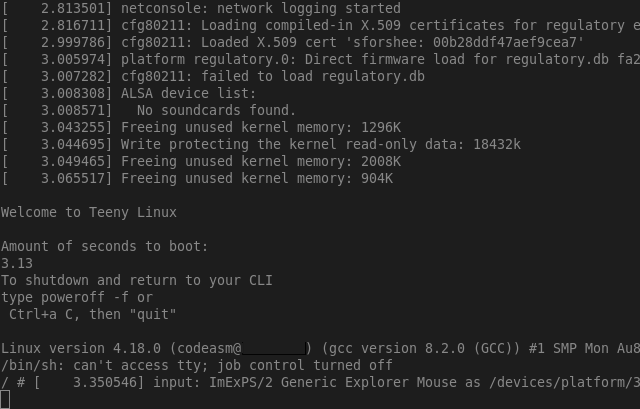
- The kernel currently is: 8.8M (14M - x86_64)
- Boots in qemu within 2.71 seconds.
- The initramfs without other programs but busybox: 1.3M
- Added musl will grow the initramfs: 78Mb
With careful manipulation, the kernel can be made smaller, as well initramfs (which seems to have grown over the lifespan of this little project)
user root, password root
When dropbear is added and ssh enabled, !! change default password !!
Updated to the latest I know Kernel and applications
| Package | Version | Date |
|---|---|---|
| Linux kernel | 7.2 | 2026-08-16 |
| BusyBox | 1.38.0 | 2026-05-13 |
| Dropbear | 2026.91 | 2026-05-10 |
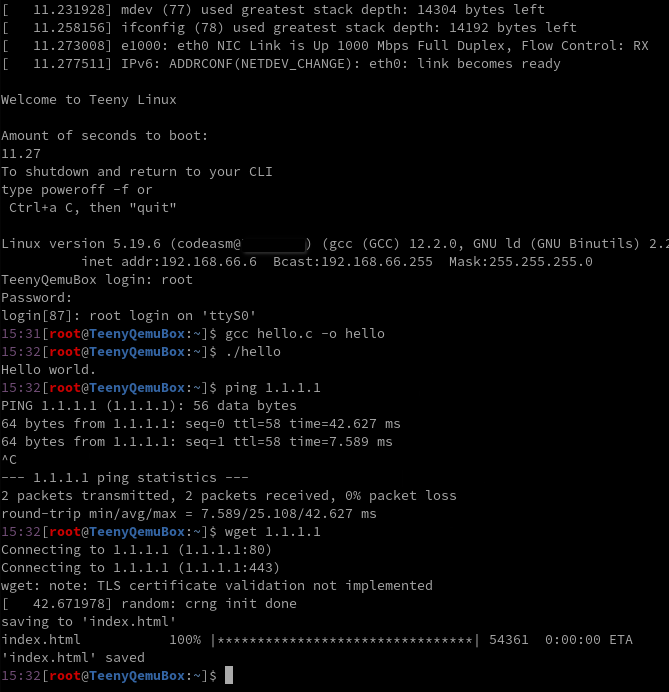
Latest TeenyLinux with (optional) Musl and networking turned on (slower startup due to 270mb extra musl compiler)
- Added a ReqCheck.sh to check for basic program requirements and permissions.
- extracted the user variables to vars.sh, no more main build.sh updates too often
- beta tools script, based on LFS.
- Added a license file, COPYING, we are now GPL2.0 (or later)
- Succesfull build a i686 (Pentium III like) system.
see crosstools.sh for a ARM attempt, currently boots the kernel, and no busybox or temp init.
Linux kernel 6.8 removed a number of traffic control related symbols. An easy fix has been applied: https://bugs.busybox.net/show_bug.cgi?id=15934 but more elegant until Busybox fixes the TC command would be: https://bugs.gentoo.org/926872
My goals in no particular order are:
- Run Linux on any/most CPUs (that qemu offers, and that interests me ;) ).
- Crosscompile Linux (probably x86_64 as a base).
- Partial functional
- Have Firewire terminal on PowerPC. (this is part of another project)
- Have small amount of scripts that can build and partially test various goals
- get an update system working (possibly pacman, for LFS, or busybox dpkg)
- smaller compiler for inside (TCC, work has started in a branch)
- separate certain documentation to other files.
Most of my research and/or experimenting is done on a x86_64 Arch Linux system, I assume the reader is skilled enough to translate any commands or hints to their own system or reading other resources to accomplish their own goals. This is never meant for production or replacing LFS for example.
run the build script :D
./build.shif your system does not meet the build requirements, ReqCheck.sh will tell you, it's automatically called by build.sh, install what's needed or change to your liking.
If wanted, customize versions in vars.sh, here you can test kernel versions, busybox versions and arch variables. this file also changes the most often upon version bumps. Some interesting variables can be changed here as well that are used by the final running Linux, ip addresses, hostname. One could even change the default init, if you install your own before compilation (../bin/build/)
The build script knows the following commands passed as arguments:
./build.sh -ddeletes all but the tarball files (handy to restart building without downloading the tarballs)
./build.sh -arch [ppc|x86_64|i686]builds for the selected arch, x86_64 is default though, for x86, specify i686. For now, it's best to set these in vars.sh
./build.sh -initBuilds or rebuilds only the initramfs and then tries to run qemu, handy when trying new init programs or other initramfs tests
./build.sh -k <kernel version>
./build.sh -kernelBuild and start an instance with a MAC address of choice
./build.sh -net <macaddr>for example
./build.sh -net 52:55:00:d1:55:01Will run a VM with that specific macaddr (you need to change the ip inside or do DHCP trickery).
More networking documentation, hints and tricks can be found in Networking.md
I've added a user called root inside the passwd file, to login, use password root
to build without login prompt:
./build.sh -nl
./build.sh -nologin
this is like the old behavior from M.Galgs blogposts.
./build.sh -t
or
./build.sh -time
The above function has been added to measure the compilation time for the whole project and separate parts. Already figured out the kernel compiles faster?!? by cleaning the sources. Busybox can use a precompiled sourcetree just fine. Overall not much different. There will be no qemu running at the end. This option might change in the future.
Before any module can be compiled, a first run without support has to be done, or at least the Linux kernel source folder should be compiled. The sample module is a git submodule, and you should init this if you haven't already by:
git submodule init
git submodule update
for more submodule details, check: Cloning a Project with Submodules
Then first do a dry run build without modules:
./buildAfter building the kernel, termination of the qemu instance is possible a simple test to see there are no mods also possible Right after compilation, go into the modules folder, delete the old initramfs and compile a new module. after completion, rebuild initramfs and test the installed module:
cd module
make clean
make
cd ..
./build -mod
alternatively this can also be used to make a new init, for instance to add other tools from the build dir.
./build -modulefeel free to do this differently when requirements change currently loads a test module and supports
modprobe [module name]
lsmod
modprobe -r [module name]
check build script where to place module or change code to load yours. default script copies the hello.ko to /lib/module/[arch]/
For new programs to be added, there are multiple ways to do so. The easiest I think is to either manually or using a script to build and copy the required files into the to be made initramfs.
Everything inside the $TOP/bin/build/ will be copied over to the new initramfs.
Dropbear is an example build script that will build dropbear (an SSH server/client) statically compiled.
Based on Dropbear, Musl precompiled installer script has been added. More information and the tarball can be found here: https://musl.cc/ Run to install:
./musl.shDon't forget to rebuild init, with for example
./build.sh -initNow compilation using gcc inside the environment should be possible. The included C source should compile successfully to hello and display hello world using:
g++ -o hello hello.cpp
./hello
Uninstalling, or actually deleting. It will delete the complete /build/ contents, rerun other tools if needed to keep:
./musl.sh -dFor a while it was possible to generate a bootable iso, it should now work with the latest kernel. After successful building of teenylinux, one can run:
mkiso.shThis will produce a boot.iso in the ../obj/($TOP) folder . and try to boot it in qemu as well.
The mkiso file will check if mkrescue and xorriso are installed on your system, reqcheck will not check for this.
If you want Musl and or dropbear to be included or any other tool in the initramfs, please add them to the build folder as described in chapter Adding new programs. The ../bin/iso/ folder is not removed, one could add files there aswell to be included with the iso file (grub modules maybe?). Checking mkiso.sh and making appropriate modifications is probably best.
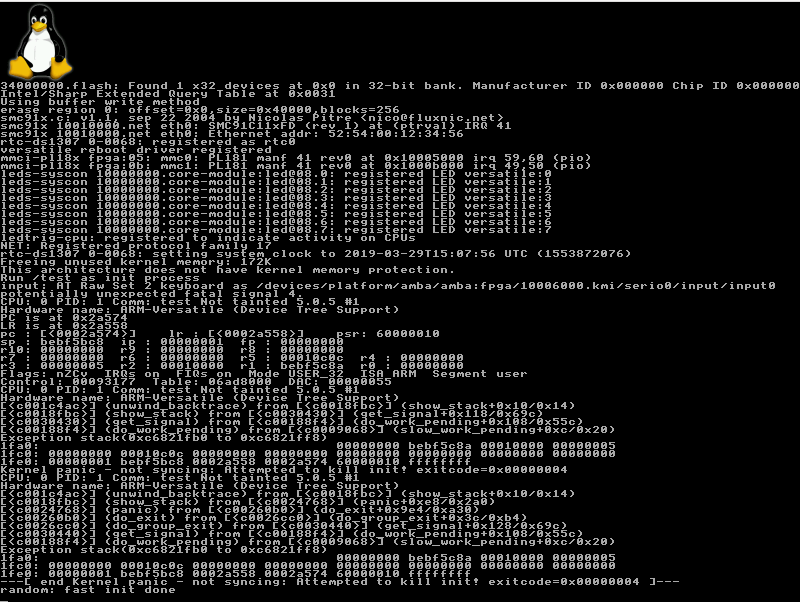
UPDATE, changed a few things around. Crosstools would now only make the tools (test it) and then you'd use build with an arch command.
as seen in picture, my static linked init didn't get compiled against 5.0.5 kernel headers but to 3.2.0, i'll fix that someday maybe
this is work in progress
To do cross-compiling I've made a script called "crosstools.sh" that will add cross-compile tools if you don't have any. From here on the variable arch can be set to the arch you made cross-tools for.
cross-compile.sh will build an ARM-based kernel and tries to boot it using qemu, for successful compiling, requires: arm-none-eabi- series.
./cross-compile.shor to delete the compile attempt (without removing large downloaded files)
./cross-compile.sh -dMore information, hints and my progress might be found at Crosscompiler.md
This project contains multiple components, each licensed separately.
All scripts, build files, and original content in this repository (unless otherwise noted) are licensed under:
GNU General Public License v2 or (at your option) any later version
SPDX-License-Identifier: GPL-2.0-or-later
For the full license text, see the COPYING file at the top level of this repository.
If you modify and redistribute these files, you must provide the corresponding source under the same license terms.
This project uses third-party software, including:
- Linux kernel — licensed under GNU GPL v2 only
- BusyBox — licensed under GNU GPL
- Other tools — licensed under their respective upstream licenses
These components remain under their original licenses; this project does not modify or override those terms.
Licensing obligations apply on a per-component basis. Use of this project does not impose additional requirements beyond those of the applicable upstream licenses.
The following resources were used making this project or helped solve problems. "Attribution" as per stackoverflow. as some code might have evolved away from the "answers", I choose to put the links here under headings of general meaning. The link titles are descriptive enough.
- https://gts3.org/2017/cross-kernel.html
- https://balau82.wordpress.com/2010/02/28/hello-world-for-bare-metal-arm-using-qemu/
- https://github.com/netbeast/docs/wiki/Cross-compile-test-application
- http://preshing.com/20141119/how-to-build-a-gcc-cross-compiler/
- http://www.clfs.org/view/CLFS-3.0.0-SYSTEMD/ppc64-64/materials/packages.html
- https://stackoverflow.com/questions/33450401/building-gcc-make-all-error-2
- https://gcc.gnu.org/ml/gcc-help/2012-07/msg00018.html
- https://www.computerhope.com/unix/ucpio.htm
- https://unix.stackexchange.com/questions/56614/send-file-by-xmodem-or-kermit-protocol-with-gnu-screen/65362#65362
- https://www.computerhope.com/unix/ucpio.htm
- https://unix.stackexchange.com/questions/56614/send-file-by-xmodem-or-kermit-protocol-with-gnu-screen/65362#65362
- https://www.lifewire.com/bash-for-loop-examples-2200575
- https://landley.net/aboriginal/bin/
- https://stackoverflow.com/questions/46695403/how-to-add-a-carriage-return-with-sed
- https://blog.christophersmart.com/2016/08/31/configuring-qemu-bridge-helper-after-access-denied-by-acl-file-error/
Some people dislike bash, and set their default shell to something else than bash. This leads to incompatibilities between "scripts" and thus requires minor and sometimes major code changes to support these different shells. I cannot test them all, but I try to make them compatible. For now, bash is the default. I might consider zsh.
For teenylinux I've swapped to (d)ash (sh like) and this also required a profile change:
- https://linux.die.net/man/1/ash
- https://unix.stackexchange.com/questions/176027/ash-profile-configuration-file
- https://www.in-ulm.de/%7Emascheck/various/ash/
- https://stackoverflow.com/questions/58924424/why-does-gdb-does-not-show-debug-symbols-of-kernel-with-debug-info
- https://github.com/amezin/vscode-linux-kernel
- https://www.kernel.org/doc/html/v4.10/dev-tools/gdb-kernel-debugging.html
- https://elinux.org/Debugging_The_Linux_Kernel_Using_Gdb
- https://www.starlab.io/blog/using-gdb-to-debug-the-linux-kernel
- https://sourceware.org/gdb/onlinedocs/gdb/Auto_002dloading-safe-path.html
- https://www.kernel.org/doc/Documentation/dev-tools/gdb-kernel-debugging.rst
- https://stackoverflow.com/questions/17939930/finding-out-what-the-gcc-include-path-is
- https://stackoverflow.com/questions/2188751/linking-iostream-h-in-linux-using-gcc/2188765#2188765
- https://gts3.org/2017/cross-kernel.html
- https://balau82.wordpress.com/2010/02/28/hello-world-for-bare-metal-arm-using-qemu/
- https://github.com/netbeast/docs/wiki/Cross-compile-test-application
- https://balau82.wordpress.com/2010/03/22/compiling-linux-kernel-for-qemu-arm-emulator/
- https://designprincipia.com/compile-linux-kernel-for-arm-and-run-on-qemu/
- https://stackoverflow.com/questions/49391116/build-newlib-with-existing-cross-compiler
- https://wiki.osdev.org/Porting_Newlib
- https://github.com/john-tipper/Cross-compile-toolchain-for-linux-on-OSX/
- https://stackoverflow.com/questions/11307465/destdir-and-prefix-of-make
- https://www.monperrus.net/martin/compiling-c-code-with-dietlibc-and-tcc
- https://linuxhandbook.com/bash-arrays/
- https://www.cyberciti.biz/faq/finding-bash-shell-array-length-elements/
Resolved an init kernel problem: https://stackoverflow.com/questions/15277570/simple-replacement-of-init-to-just-start-console
timing: