
Track 1 implementation: a safe, human-governed AI coding agent with:
ide-plugin/: VS Code extension for AI tasks + local guardrailsguardian-web/: dashboard and backend APIs for approvals, incident mode, policy, auditsqlite/: SQLite schema for demo/compatibility mirror persistence
Backend now supports:
BACKEND_MODE=demo: JSON + SQLite mirrorBACKEND_MODE=prod: Postgres (Prisma) + Redis/BullMQ + async plan worker- OpenAI structured planning reliability layer + eval gate + OTel hook
Use this file as the canonical setup/run guide. Module-specific details live in:
guardian-web/README.mdide-plugin/README.md
| Mode | Trigger | What it enables |
|---|---|---|
auto_approved |
score < auto_approve_below and all guardrails pass |
safe fast path for trivial changes without reviewer wait time |
warning |
moderate risk, but no protected-path, secret, or destructive-command guardrail hit | visible caution with full rationale while still allowing progress |
approval_required |
high risk, protected path, destructive command, or secret signal | human approval gate before code can be applied |
blocked |
deny rule matched | hard stop for unsafe classes of changes such as direct production infra edits |
- Explainable review decisions: plans now return
review.mode, rationale lines, matched policy rules, and guardrail pass/fail signals. The plugin and dashboard both show "Why this decision happened" with local, backend, and final risk context. - Defensible low-risk automation: the backend only auto-approves when the score is below the configured threshold and no destructive commands, protected paths, secret detections, large blast radius, or oversized diffs are present.
- Real RBAC and dual approval: dashboard actions now use authenticated demo actors, scores at or above the default
require_dual_approval_above=85threshold need two distinct reviewers, and audit logs record the actual actor identity and role. - Executed verification evidence: the plugin runs allowlisted repo checks when available and attaches the results to the CR so reviewers see executed
lintandtestevidence instead of placeholders. - Runtime posture visibility: the dashboard now shows whether the service is running in
demoorprod, whether the async queue is enabled, and which datastore is active.
- Faster demos and safer day-to-day use because small changes can move immediately with an audit trail explaining why.
- Enterprise-style governance because approvals, policy edits, and incident mode actions now enforce role boundaries instead of trusting free-form names.
- More trustworthy review conversations because reviewers can see the exact risky path, command, guardrail miss, and verification evidence behind each decision.
- Cleaner operational storytelling because the runtime card makes it obvious whether the team is demonstrating the lightweight demo stack or the full production path.
README.md: canonical cross-platform setup + runproject_documentation.md: submission-focused methodology/results/testing document (Markdown draft for final PDF conversion)testbench/README.md: grader entry point for setup/run validationtestbench/setup-and-run.md: step-by-step setup and execution guide for graderstestbench/test-cases.md: structured manual validation scenarios and expected behaviorguardian-web/README.md: dashboard/backend module guideide-plugin/README.md: extension module guidedocs/backend-storage-features.md: storage feature mapping (legacy Supabase intent -> SQLite implementation)docs/backend-eval-benchmarks.md: eval-gate benchmark table (before/after)docs/mermaid.md: architecture diagram (Mermaid source for documentation and GitHub rendering)docs/README.md: docs index/maintenance notes

Primary editable architecture source: docs/mermaid.md
Final exported diagram used in this README: .github/assets/haloop-architecture-final.png
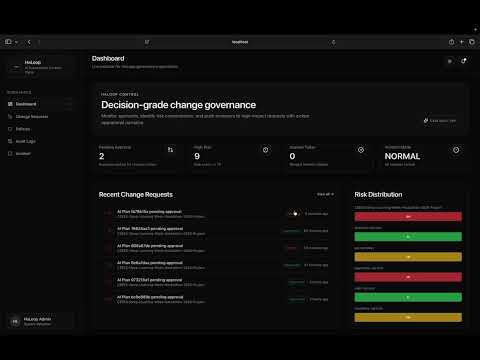
Main Dashboard

Central hub for tracking AI-generated change requests and approval statuses.
Policy Management

Define security boundaries and automated human review triggers.
Audit Trail

Comprehensive logs of all AI interactions and governance decisions.
VS Code Plugin Integration

In-IDE guidance showing real-time risk levels and pending approvals.
AI Governance Chat

AI assistive analysis that explains governance signals, risk rationale, and recommended next actions for the developer.
Backend Processing Logs

Technical view of the risk evaluation engine and state transitions.
System Governance Control

Admin overrides for global security locks and emergency incident response.
git- Node.js
22.xand npm - VS Code
Reason for Node 22: backend mirror uses Node built-in node:sqlite.
bashcurljquuidgen
Needed by:
guardian-web/scripts/test-integration-flow.sh
node -v
npm -v
git --version
code --version
curl --version
jq --version
uuidgen
If code is unavailable, run extension host via VS Code F5.
Important for the backend demo path:
- Do not install the latest Prisma release for this project.
- Use Prisma 6 to match the
guardian-webcode and schema tooling. - Run the Prisma and
openaiinstalls insideguardian-web, not at the repository root. - Run
npx prisma generatebefore startingguardian-web.
cd guardian-web
npm ci
npm install prisma@6 @prisma/client@6 openai
npx prisma generate
cd ../ide-plugin
npm ci
cd ..Set-Location guardian-web
npm ci
npm install prisma@6 @prisma/client@6 openai
npx prisma generate
Set-Location ../ide-plugin
npm ci
Set-Location ..If you need to repair dependencies manually, use npm install prisma@6 @prisma/client@6 openai inside guardian-web.
Do not run npm install prisma or npm install @prisma/client without the @6 version pin, and do not run those installs from the repository root.
From repo root:
docker compose up --buildThis launches guardian-web, guardian-worker, postgres, and redis.
cd guardian-web
npx prisma generate
npm run dev
Runs on http://localhost:3000 by default.
cd ../ide-plugin
npm run build- Open
ide-plugin/in VS Code. - Press
F5. - Run
Extensionlaunch target.
{
  "aiGov.backendUrl": "http://localhost:3000",
  "aiGov.apiKey": "",
  "aiGov.requestedBy": "demo-presenter",
  "aiGov.pollIntervalMs": 3000
}
aiGov.backendUrl accepts either:
http://localhost:3000http://localhost:3000/api
The plugin normalizes both.
For the demo flow it now defaults to http://localhost:3000, so you only need to set this explicitly if you want to override it.
Guardian Web includes a dashboard actor switcher for demo mode. The same identities can be used directly against mutating APIs with Authorization: Bearer <token>.
| Actor | Bearer token | Role | Effective permissions |
|---|---|---|---|
| Avery Admin | haloop-admin-token |
admin |
approve, reject, edit policy, toggle incident mode |
| Lina Lead | haloop-lead-token |
lead |
approve, reject, edit policy, toggle incident mode |
| Devon Developer | haloop-developer-token |
developer |
approve only |
| Vera Viewer | haloop-viewer-token |
viewer |
read-only |
Notes:
- The dashboard actor switcher is the fastest way to demonstrate RBAC live.
- API mutations now authenticate the actor and no longer trust free-form reviewer names in the request body.
- By default, scores
>= 85require two distinct approvers before a CR becomes fully approved.
Initialized automatically by guardian-web.
- default path:
guardian-web/.data/backend-mirror.sqlite - override path:
SQLITE_DB_PATH
Example:
SQLITE_DB_PATH=.data/custom-backend.sqlite npm run devReference schema: sqlite/migrations/0001_init.sql
POST /generate-planPOST /approvalsGET /approvals/:approvalId/decisionGET /approvals/:approvalId/events
POST /api/ai/planPOST /api/approvalsGET /api/runtimeGET /api/crGET /api/cr/:idPOST /api/cr/:id/approvePOST /api/cr/:id/rejectPOST /api/cr/:id/request-changesGET /api/auditGET /api/audit?view=compactPUT /api/policy/path-rulesPUT /api/incident
cd guardian-web
npm run lint
npm run build
npm run eval:gatecd ide-plugin
npm run build
npm testRequires bash, curl, jq, uuidgen and running dashboard.
cd guardian-web
BASE_URL=http://localhost:3000 npm run test:integration
Reset demo-mode storage:
- delete
guardian-web/.data/integration-store.json - delete
guardian-web/.data/backend-mirror.sqlite - delete
guardian-web/.data/backend-mirror.sqlite-wal - delete
guardian-web/.data/backend-mirror.sqlite-shm
On the next request in BACKEND_MODE=demo, Guardian Web recreates fresh seeded state and a new SQLite mirror automatically.
For BACKEND_MODE=prod, persistent state lives in Postgres through the postgres-data Docker volume declared in docker-compose.yml.
- Confirm
guardian-webis running onhttp://localhost:3000. - Check workspace setting
aiGov.backendUrl. - Reload extension host window after settings change.
- Rebuild plugin:
cd ide-plugin
npm run buildUse Git Bash or WSL for script-based flows.