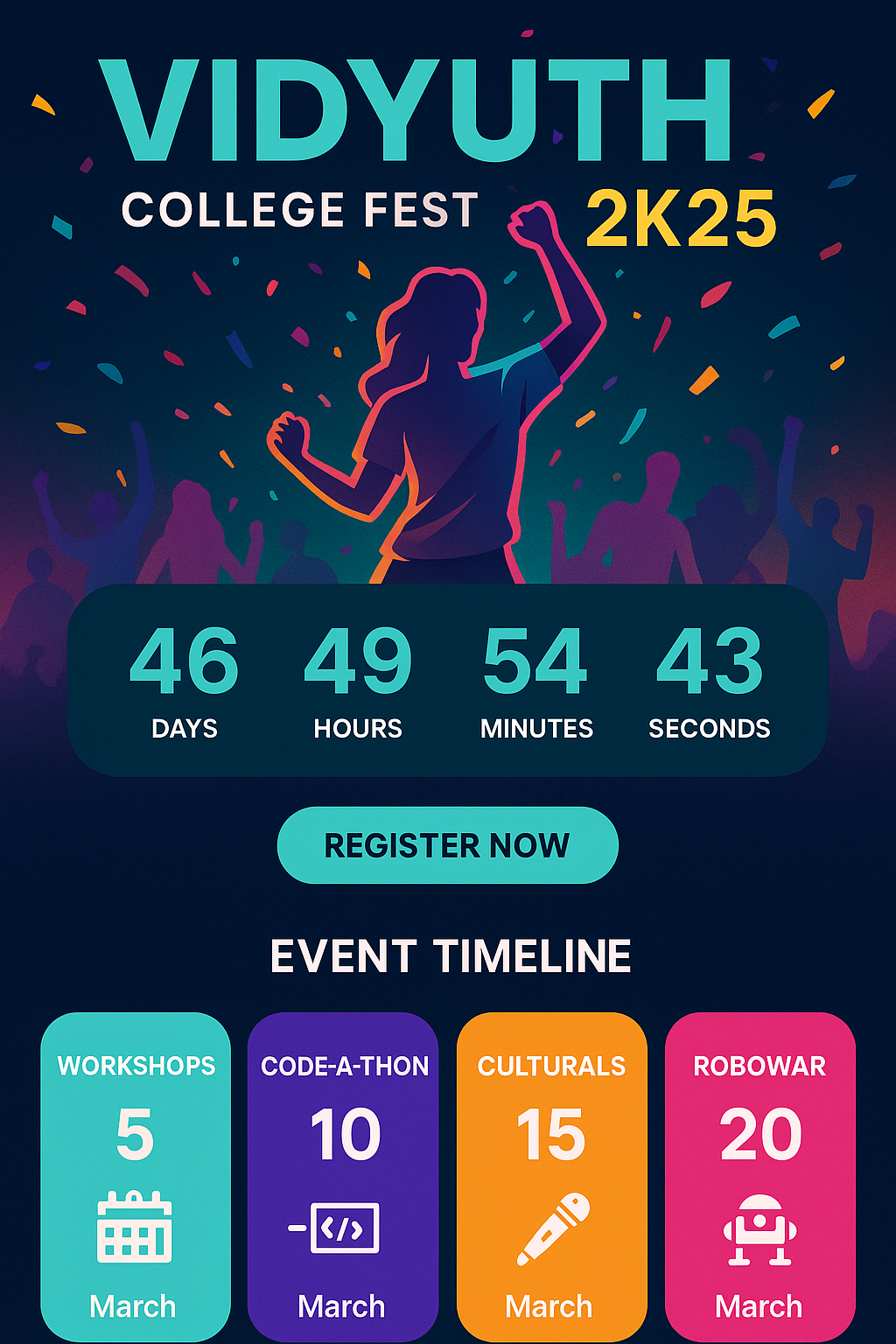
Annual College Fest Website for VidyaVardhaka College of Engineering, Mysuru





🗓️ April 25-27, 2025 | 📍 VidyaVardhaka College of Engineering, Mysuru
Vidyuth 2K25 is the official website for the annual college fest of VidyaVardhaka College of Engineering, Mysuru. This modern, responsive web application features a countdown timer, event timeline, registration system, and interactive UI elements designed to create an engaging experience for students and visitors.
- Real-time countdown to the fest start date (April 25, 2025)
- Dynamic display of days, hours, minutes, and seconds
- Auto-refreshing every second
- Chronologically ordered event schedule
- Date and time information for each event
- Beautiful card-based layout with hover effects
- Complete 3-day fest coverage (April 25-27, 2025)
- User-friendly registration form
- Date picker for event selection
- Form validation and submission handling
- Contact information collection
- Vibrant teal accent colors (#008080)
- Light backgrounds with bright highlights
- Smooth hover animations and transitions
- Mobile-responsive design
- Bold typography for enhanced readability
- Dedicated contact section
- Email and phone information
- Easy communication channels
- 9:00 AM - Auto Extravaganza
- 10:00 AM - Mehendi Competition
- 2:00 PM - Gaming Tournament
- 7:00 PM - Dance Night
- 9:00 AM - Hackathons and Workshops
- 10:00 AM - Math Tea Club
- 11:00 AM - Treasure Hunt
- 2:00 PM - Dance and Singing Competitions
- 10:00 AM - Art Exhibition
- 11:00 AM - Dog Show
- 7:00 PM - Night Concerts
- 9:00 PM - Music & Dance Party
| Frontend |


|
| Styling |


|
| Backend & Database |


|
| AI Integration |


|
| Development Tools |


|
Before you begin, ensure you have the following installed:
- Node.js (18.0 or later)
- npm or yarn
- Git
-
Clone the repository
git clone https://github.com/LoganthP/DevCom-Final-Project.git cd DevCom-Final-Project -
Install dependencies
npm install # or yarn install -
Set up environment variables
cp .env.example .env.local
Configure your environment variables:
# Firebase Configuration
NEXT_PUBLIC_FIREBASE_API_KEY=your_firebase_api_key
NEXT_PUBLIC_FIREBASE_AUTH_DOMAIN=your_project.firebaseapp.com
NEXT_PUBLIC_FIREBASE_PROJECT_ID=your_project_id

# AI Configuration (Optional)
GOOGLE_GENAI_API_KEY=your_google_ai_api_key
-
Start the development server
npm run dev # or yarn dev -
Open your browser Navigate to
http://localhost:9002to see the application.
src/
├── app/
│   ├── page.tsx           # Main homepage with all sections
│   ├── layout.tsx         # Root layout component
│   └── globals.css        # Global styles
├── components/
│   ├── ui/                # Reusable UI components
│   │   ├── card.tsx
│   │   ├── button.tsx
│   │   ├── input.tsx
│   │   ├── calendar.tsx
│   │   └── ...
│   └── layout/           # Layout components
├── ai/                   # AI integration (optional)
├── lib/
│   └── utils.ts          # Utility functions
└── docs/
    └── blueprint.md      # Project specifications
- Primary: Vibrant Teal (#008080) - Innovation and energy
- Background: Light backgrounds with bright accents
- Text: Bold typography for enhanced readability
- Interactive: Smooth hover effects and transitions
- Font: Inter - Clean, modern sans-serif
- Headings: Bold weights for impact
- Body: Optimized for readability
- Cards: Clean, organized layout with hover effects
- Forms: User-friendly with validation
- Timeline: Chronological event display
- Countdown: Real-time timer with dynamic updates
# Development
npm run dev              # Start development server with Turbopack (port 9002)
npm run genkit:dev       # Start AI development environment (optional)
npm run genkit:watch     # Watch mode for AI flows (optional)

# Production
npm run build            # Build for production
npm run start            # Start production server

# Quality Assurance
npm run lint             # Run ESLint
npm run typecheck # TypeScript type checking- Turbopack: Enabled for faster development builds
- TypeScript: Strict mode with build error handling
- Port: 9002 (customizable)
- Custom Theme: Festival-themed color palette
- Component Library: shadcn/ui integration
- Responsive Design: Mobile-first approach
- Animations: Smooth transitions and hover effects
- Push to GitHub
- Connect repository to Vercel
- Configure environment variables
- Deploy automatically
- Build the project:
npm run build - Deploy the
outfolder to Netlify
- Build the application:
npm run build - Upload build files to your hosting provider
- Configure environment variables on the server
- Real-time Updates: Automatically refreshes every second
- Responsive Design: Adapts to different screen sizes
- Dynamic Calculation: Calculates time difference to April 25, 2025
- Visual Appeal: Eye-catching display with proper formatting
- Chronological Order: Events sorted by date and time
- Interactive Cards: Hover effects for better UX
- Detailed Information: Event name, time, and description
- Responsive Grid: Adapts to mobile and desktop layouts
- Form Validation: Built-in validation with error handling
- Date Selection: Interactive calendar for event dates
- User Experience: Smooth form interactions
- Data Collection: Name, email, and event preferences
- Fast Loading: Optimized with Next.js and Turbopack
- Responsive Images: Automatic image optimization
- Efficient Bundling: Tree shaking and code splitting
- SEO Optimized: Meta tags and structured data
- Environment Variables: Secure configuration management
- Form Validation: Input sanitization and validation
- Firebase Integration: Secure backend services
- Type Safety: TypeScript for compile-time error checking
- ESLint: Follow the configured rules
- TypeScript: Strict type checking
- Prettier: Code formatting
- Conventional Commits: Clear commit messages