Usage
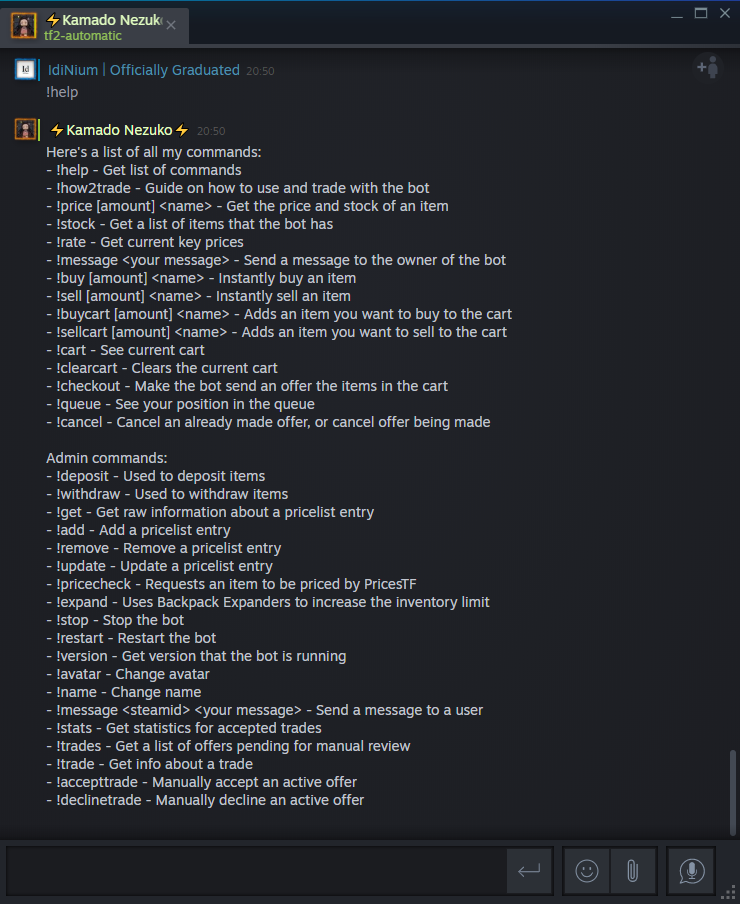
In order to have your bot to start trading, you will need to tell your bot what items to buy/sell/bank by adding the items to the pricelist through Steam Chat. The command that you will use is !add.
You have 3 choices of item identifying parameters on how you want to add your items:
-
name- Must be the item based name (without any quality/effect/Killstreak and etc) -
defindex- The item definition index. You can find it here or here -
sku(recommended) - The item "Stock Keeping Unit".
These two parameters act the same since the defindex (in integer form) is just a replacement for the name of an item (if the bot failed to choose the item, so it needs more specific detail of an item). There are 6 optional sub-parameters under these two item identifying parameters:
Table I.1: Sub-parameters for name and defindex.
| Parameter | Default | Description |
|---|---|---|
craftable |
true |
Set to false if you want the item to be a Non-Craftable. |
quality |
Unique |
Normal/ Genuine/ Vintage/ Unusual/ Unique/ Community/ Valve/ Self-made/ Strange/ Haunted/ Collector's/ Decorated (this is case sensitive). |
australium |
false |
Set to true if you want that item to be an Australium (Australium-able weapons only). |
effect |
null |
An Unusual effect name, for example: Sunbeams or Green Confetti. |
killstreak |
0 |
This should be in an integer of 1 to 3 only. 1 - Killstreak, 2 - Specialized Killstreak, and 3 - Professional Killstreak. |
festive |
false |
Set to true if the item is Festivized. |
paintkit |
null |
When adding a decorated weapon/skin. This should be the War Paint name (broken). |
Example:
- Tour of Duty Ticket:
-
!add name=Tour of Duty TicketOR -
!add defindex=725(no need to add sub-parameter since this is the default).
-
- Non-Craftable Tour of Duty Ticket:
-
!add name=Tour of Duty Ticket&craftable=falseOR !add defindex=725&craftable=false
-
- Vintage Pyro's Beanie:
-
!add name=Pyro's Beanie&quality=VintageOR !add defindex=51&quality=Vintage
-
- Strange Silver Botkiller Minigun Mk.II:
-
!add name=Silver Botkiller Minigun Mk.II&quality=StrangeOR !add defindex=958&quality=Strange
-
- Pyroland Daydream Smissmas Saxton:
-
!add name=Smissmas Saxton&quality=Unusual&effect=Pyroland DaydreamOR !add defindex=31089&quality=Unusual&effect=Pyroland Daydream
-
- Strange Australium Tomislav:
-
!add name=Tomislav&quality=Strange&australium=trueOR !add defindex=424&quality=Strange&australium=true
-
- Strange Festivized Australium Tomislav:
-
!add name=Tomislav&quality=Strange&australium=true&festive=trueOR !add defindex=424&quality=Strange&australium=true&festive=true
-
- Strange Professional Killstreak Australium Tomislav:
-
!add name=Tomislav&quality=Strange&australium=true&killstreak=3OR !add defindex=424&quality=Strange&australium=true&killstreak=3
-
- Festive Black Box:
-
!add name=Festive Black BoxOR !add defindex=1085
-
*Notes:
-
If you want to add Mann Co. Supply Crate Key with name parameter, it will list out all possible key defindexes from the tf2 schema. Please choose the one at the top with the name Decoder Ring and use
!add defindex=5021.
-
When you want to add a stock weapon (such as Scattergun, Minigun and etc), there are two defindexes for stock weapons. You only need to use the one with Upgradeable_TF_WEAPON_NAME and use that defindex.

-
Festive and Festivized are two different things. When adding a Festive weapon, please include
Festivein the item name (oh and yes, the item defindex is also different), but ifFestivized, you need to add the sub-parameterfestive=true. -
If you want to add
Name TagorNon-Craftable Name Tag, you will need to use the correct defindex, which is5020instead of2093. This bug can not be fixed unless Team Fortress 2 updates its schema to remove the wrong defindex.
This parameter is recommended because you will no longer need to use the sub-parameters in Table I.1. So how can I find the sku of a specific item?
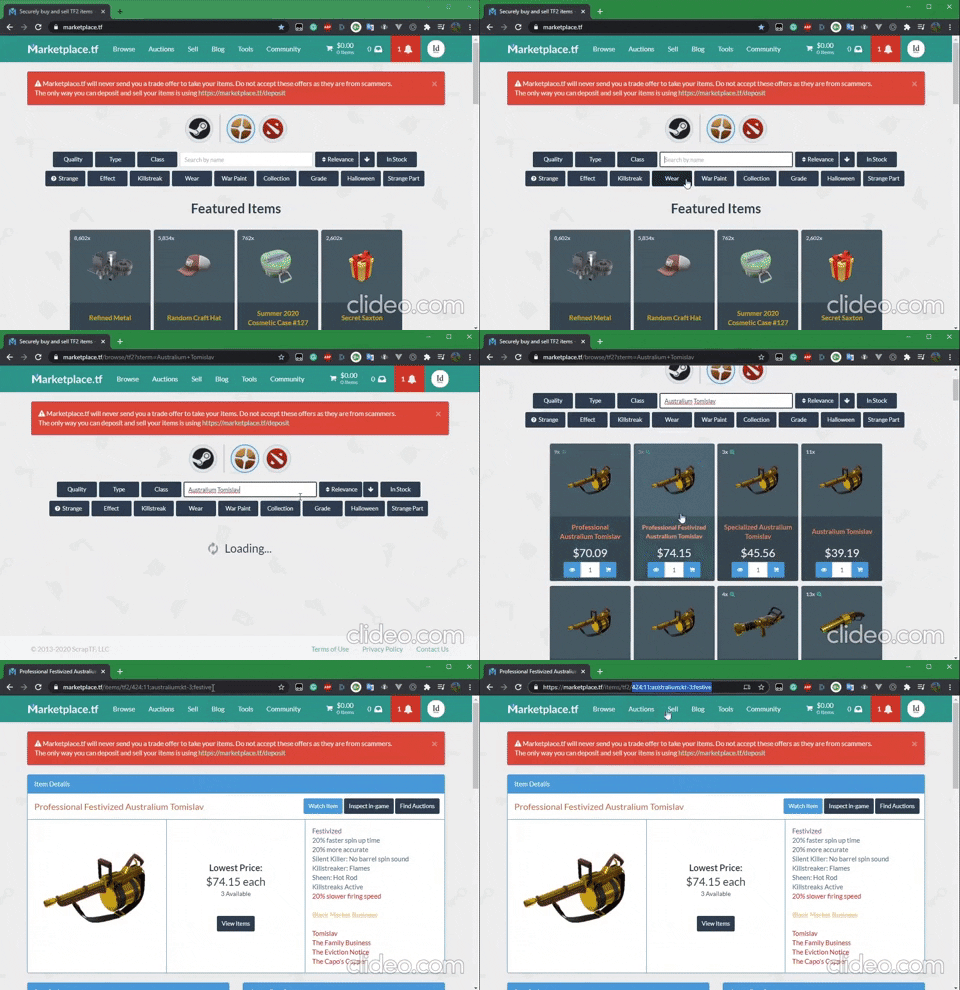
- Go to Marketplace.tf.
- In the search bar, type in the item name or unusual effect, or anything related.
- If "No items found", simply click on the "In stock" button two to the right of the search bar and it will change to "Not In Stock".
- If your desired item appeared, click on it and take a look at the URL. The item sku is right at the end of the URL.
-
Example 1:
- Item: Sunbeams Cosa Nostra Cap
- URL: https://marketplace.tf/items/tf2/459;5;u17
-
sku: 459;5;u17 - to add:
!add sku=459;5;u17
-
Example 2:
- Item: Specialized Festivized Australium Tomislav
- URL: https://marketplace.tf/items/tf2/424;11;australium;kt-2;festive
-
sku: 424;11;australium;kt-2;festive - to add:
!add sku=424;11;australium;kt-2;festive
When adding items with only identifying parameter, the item will be set to have the default settings for it to be listed on backpack.tf.
Table I.2: Listing settings parameters.
| Parameter | Default | Description |
|---|---|---|
intent |
bank |
Other option is buy or sell. If set to buy, then your bot will only create a buying listing for that item, and once bought, it will be removed. |
min |
0 |
Minimum stock to keep. |
max |
1 |
Maximum stock your bot can have. |
autoprice |
true |
If you set to false, then you need to include the buy AND sell (yes, AND means both) parameters to set the price of the item manually. |
buy.keys |
0 |
Manually set buying price in keys. |
buy.metals |
0 |
Manually set buying price in refined metal. |
sell.keys |
0 |
Manually set selling price in keys. |
sell.metals |
0 |
Manually set selling price in refined metal. |
enabled |
true |
If you want to keep the item in the pricelist but don't want to trade, then set this to false
|
Example of what you want to have:
-
Example 1:
- Item: Max's Severed Head (
162;6) - intent: bank
- min: 0
- max: 3
- autoprice: true
- enabled: true
- command:
!add sku=162;6&max=3(no need to add the other this since they are all default).
- Item: Max's Severed Head (
-
Example 2:
- Item: Strange Australium Stickybomb Launcher (
207;11;australium) - intent: sell
- min: 0
- max: 1
- autoprice: false
- enabled: true
- sell price: 23 keys
- buy price: 19 keys, 21.55 ref
- command:
!add sku=207;11;australium&intent=sell&sell.keys=23&buy.keys=19&buy.metal=21.55
- Item: Strange Australium Stickybomb Launcher (
*Notes:
- If you want to sell it for only in keys, then you can ignore the
sell.metalparameter, but then you still need to include thebuy.keysand/orbuy.metalparameters. - You do not need to set
autoprice=falseif you're about to manually price the item.
Sometime, after you've added the items that you want your bot trade, you might change your mind to adjust the min and max, change the intent, and maybe manually price items that your bot bought. In order to do that, you will need to use !update command.
An !update command pretty much similar to the !add command, where you need to tell your bot what item (identifying parameter) and then include the listing settings parameters that you want to update. That's mean Table I.1 and Table I.2 can also be used here. In addition to Table I.1, since the items have been added to the pricelist, now you can use a new identifying parameter instead of name, defindex, and sku: the item identifying parameter.
To use item parameter, simply put the full item name. When you're using the !add command with name or defindex identifying parameter, you need to use sub-parameters to specifically add your targeted item, but not with item parameter.
-
Example 1: Let say you want to update the
maxto 3.- Non-Craftable Tour of Duty Ticket:
- When adding item using
!addcommand (3 options):-
!add name=Tour of Duty Ticket&craftable=falseOR !add defindex=725&craftable=false!add sku=725;6;uncraftable
-
- When updating the item using
!updatecommand (4 options):!update name=Tour of Duty Ticket&craftable=false&max=3!update defindex=725&craftable=false&max=3!update sku=725;6;uncraftable&max=3!update item=Non-Craftable Tour of Duty Ticket&max=3
- When adding item using
- Non-Craftable Tour of Duty Ticket:
-
Example 2: Let say you want to update the
intentto sell and manually price the item:- Pyroland Daydream Smissmas Saxton:
- When adding item using
!addcommand (3 options):-
!add name=Smissmas Saxton&quality=Unusual&effect=Pyroland DaydreamOR !add defindex=31089&quality=Unusual&effect=Pyroland Daydream!add sku=31089;5;u145
-
- When updating the item using
!updatecommand (4 options):!update name=Smissmas Saxton&quality=Unusual&effect=Pyroland Daydream&intent=sell&sell.keys=300&buy.keys=100!update defindex=31089&quality=Unusual&effect=Pyroland Daydream&intent=sell&sell.keys=300&buy.keys=100!update sku=31089;5;u145&intent=sell&sell.keys=300&buy.keys=100!update item=Pyroland Daydream Smissmas Saxton&intent=sell&sell.keys=300&buy.keys=100
- When adding item using
- Pyroland Daydream Smissmas Saxton:
*Note:
- There is also an option for you to update the listing settings parameter on every item at once (only for updating
intent,min,max,autopriceandenabled. You can not updatebuyorsellprices with this). You can do that with!update all=trueand followed by the listing settings parameters.- Example:
!update all=true&intent=sell- This will update all of your items tointentto sell.
- Example:
If you want to remove an item from the pricelist, simply use any identifying parameters (name, defindex, sku, or item).
- Example: You want to remove Non-Craftable Tour of Duty Ticket (4 options)
!remove name=Tour of Duty Ticket&craftable=false!remove defindex=725&craftable=false!remove sku=725;6;uncraftable!remove item=Non-Craftable Tour of Duty Ticket
*Note:
You can also remove the entire pricelist with !remove all=true. Once you've sent this to your bot, it will reply with:
"Are you sure that you want to remove x items? Try again with i_am_sure=yes_i_am"
Confirm to remove all items from the pricelist with !remove all=true&i_am_sure=yes_i_am.
If you need any help, please contact us at our Discord server.