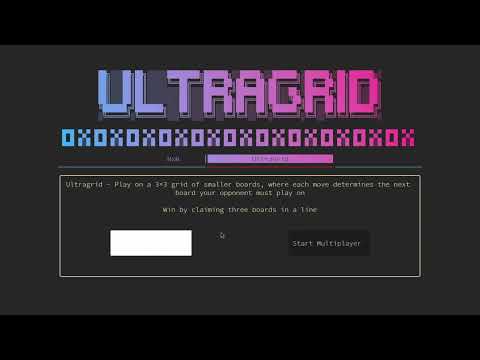
Ultragrid is an enhanced, customizable version of the classic Tic-Tac-Toe game that supports variable board sizes, advanced gameplay modes, and a modern terminal-based user interface using C++ and FTXUI.
UltraGrid reimagines Tic-Tac-Toe with:
- Nested Grid System: 3×3 grid of smaller 3×3 boards
- Dynamic UI/UX: Animated terminal interface with color gradients
- AI Opponent: Adjustable difficulty levels
- Modern C++: Utilizes C++17 features and FTXUI library
Key Innovations:
- Move constraints create deeper strategy
- Real-time visual feedback
- Multi-threaded animations
- Modular architecture for future expansion
Ultragrid/
├── src/
│   ├── include/
│   │   ├── headers/
│   │   │   ├── art.hpp                 (ASCII art for UI elements)
│   │   │   ├── endscreen.hpp           (End game display declarations)
│   │   │   ├── game_globals.hpp        (Global variables & callbacks)
│   │   │   ├── helpers.hpp             (Utility functions)
│   │   │   ├── splashscreen.hpp        (Start screen declarations)
│   │   │   ├── startmenu.hpp           (Main menu declarations)
│   │   │   ├── ultragrid.hpp           (Game mode declarations)
│   │   │   └── ultragrid_ai.hpp        (AI opponent declarations)
│   │   │
│   │   └── implement/
│   │       ├── endscreen.cpp           (End game screen implementation)
│   │       ├── game_globals.cpp        (Global state management)
│   │       ├── grid_components.cpp     (Grid UI components implementation)
│   │       ├── helpers.cpp             (Utility functions implementation)
│   │       ├── n_grid.cpp              (NxN grid mode - placeholder)
│   │       ├── splashscreen.cpp        (Start screen implementation)
│   │       ├── startmenu.cpp           (Main menu implementation)
│   │       ├── ultragrid.cpp           (Game modes implementation)
│   │       └── ultragrid_ai.cpp        (AI opponent implementation)
│   │
│   └── main.cpp                        (Application entry point)
│
├── bin/                                (Compiled executable)
├── build/                              (Build files)
├── CMakeLists.txt                      (Build configuration)
└── build.sh                            (Build script)
File Functions:
| File | Purpose | Key Features |
|---|---|---|
main.cpp |
Program entry point | Game mode routing, flow control |
art.hpp |
ASCII art storage | Logos, symbols, decorative elements |
game_globals.hpp |
Global state management | Player tracking, move history |
grid_components.cpp |
Core game grid | TicTacToeButton, SmallGrid, LargeGrid classes |
ultragrid_ai.cpp |
AI logic | Difficulty levels, move strategies |
startmenu.cpp |
Main menu | Animated UI, mode selection |
endscreen.cpp |
Game completion | Victory/Draw handling, restart options |
Game System
├── UI Flow Controllers
│   ├── StartupUI()                     [startmenu.cpp]
│   │   └── Returns selected game mode
│   │
│   ├── RenderStartScreen()             [splashscreen.cpp]
│   │   └── Displays splash screen with ASCII art
│   │
│   └── EndScreenUI()                   [endscreen.cpp]
│       └── Shows game results and options
│
├── Game Logic Managers
│   ├── UltragridGameManagerMultiplayer [ultragrid.cpp]
│   │   ├── Properties
│   │   │   ├── screen: ScreenInteractive&
│   │   │   ├── gamestatus: int&
│   │   │   ├── grid: LargeGrid
│   │   │   ├── gridcmp: Component
│   │   │   ├── gridholder: Component
│   │   │   ├── options: Component
│   │   │   ├── main_container: Component
│   │   │   └── renderer: Component
│   │   │
│   │   └── Methods
│   │       ├── SetupUI(bool is_singleplayer)
│   │       ├── UpdateUI()
│   │       ├── CheckAndUpdateSmallGrids()
│   │       ├── CheckGameEnd()
│   │       ├── UpdateValidGrids()
│   │       ├── RefreshGridComponent()
│   │       └── SwitchPlayer()
│   │
│   └── UltragridGameManagerSingleplayer [ultragrid.cpp]
│       ├── Properties (inherited from UltragridGameManagerMultiplayer)
│       └── Methods
│           ├── MakeAIMove(): bool
│           └── UpdateUI() (override)
│
├── AI System
│   └── UltragridAI [ultragrid_ai.cpp]
│       └── Static Methods
│           ├── MakeMove(int difficulty, LargeGrid& grid): bool
│           ├── MakeBasicMove(LargeGrid& grid): bool
│           ├── MakeRandomMove(LargeGrid& grid): bool
│           └── MakeSmartMove(LargeGrid& grid): bool
│
├── Grid Components [grid_components.cpp]
│   ├── TicTacToeButton
│   │   ├── Properties
│   │   │   ├── gridValue: int&
│   │   │   ├── row, col: int
│   │   │   ├── isHovered, isPressed: bool
│   │   │   ├── click_release_edge: bool
│   │   │   ├── highlighted: bool
│   │   │   ├── options: TicTacToeButton_Options&
│   │   │   ├── box_: ftxui::Box
│   │   │   ├── button: ftxui::Component
│   │   │   └── screen: ftxui::ScreenInteractive&
│   │   │
│   │   └── Methods
│   │       ├── getSymbolString(int value): string
│   │       ├── makeButton(): ftxui::Component
│   │       ├── TakeFocus_btn()
│   │       ├── simulate_click()
│   │       ├── highlight()
│   │       └── GetButton(): Component
│   │
│   ├── SmallGrid
│   │   ├── Properties
│   │   │   ├── buttons[3][3]: TicTacToeButton*
│   │   │   ├── selected_x, selected_y: int
│   │   │   ├── buttonOptions: TicTacToeButton_Options*
│   │   │   ├── gridComponent: Component
│   │   │   ├── screen: ScreenInteractive&
│   │   │   ├── bigicon: int
│   │   │   └── grid[3][3]: int
│   │   │
│   │   └── Methods
│   │       ├── getbuttons(): TicTacToeButton* (&)[3][3]
│   │       ├── getGridRef(): int (*)[3]
│   │       ├── takefocus_sm_grid(int x, int y)
│   │       ├── getGridComponent(): Component
│   │       ├── setbigicon(int bigicon_set)
│   │       └── makeGridComponent(): Component
│   │
│   └── LargeGrid
│       ├── Properties
│       │   ├── grids[3][3]: SmallGrid*
│       │   ├── selected_x, selected_y: int
│       │   ├── mainComponent: Component
│       │   ├── grids_val[3][3][3][3]: int
│       │   ├── big_grid_values[3][3]: int
│       │   ├── grid_options[3][3][1]: TicTacToeButton_Options_Grid
│       │   └── screen: ScreenInteractive&
│       │
│       └── Methods
│           ├── getValue(int bigRow, int bigCol, int smallRow, int smallCol): int
│           ├── getValue_big(int bigRow, int bigCol): int
│           ├── get4DArray(int (*out)[3][3][3]): void
│           ├── setoptions(int bigRow, int bigCol, TicTacToeButton_Options op)
│           ├── set_valid_grid(int bigRow, int bigCol)
│           ├── makeGridComponent(): Component
│           ├── getComponent(): Component
│           ├── setbigicon_big(int x, int y, int icon)
│           ├── takefocus_big(int x, int y, int z, int w)
│           ├── setCurrentPlayer(int player)
│           ├── SetUpdateCallback(std::function<void()> callback)
│           └── makemove(int gx, int gy, int x, int y)
│
├── Global State [game_globals.cpp]
│   ├── namespace variables
│   │   ├── currentPlayer: int
│   │   ├── lastmove[2]: int
│   │   └── difficulty: int
│   │
│   └── namespace callbacks
│       └── onUpdate: std::function<void()>
│
├── Custom Types [headers/helpers.hpp]
│   ├── TicTacToeButton_Options = int[1]
│   ├── TicTacToeButton_Options_Grid = int[3][3][1]
│   ├── smallgrid_val_ptr = int (*)[3][3]
│   ├── largegrid_val_ptr = int (*)[3][3][3][3]
│   └── largegrid_val = int[3][3][3][3]
│
├── Enums [headers/game_globals.hpp]
│   └── CustomEvent
│       ├── RefreshComponent
│       └── BurronCallback
│
└── Helper Functions [helpers.cpp]
    ├── ExecuteCommand(const std::string& command): void
    ├── largegrid_to_cout(largegrid_val grid4d): void
    ├── print_grid(int grid[3][3]): void
    ├── checkBoard(int board[3][3]): int
    └── namespace ftxui
        ├── Split(std::string the_text): Elements
        ├── nonWrappingParagraph(std::string the_text): Element
        └── paragraphAlignCenter(const std::string& the_text): Element
                                    ┌───────────────┐
                                    │    main.cpp   │
                                    └───────┬───────┘
                                            │
                     ┌────────────────────┬─┴──────────────────┐
                     │                    │                    │
              ┌──────▼──────┐      ┌──────▼──────┐      ┌──────▼──────┐
              │ StartupUI() │      │ RenderStart │      │   EndScreen  │
              │              │      │   Screen()  │      │     UI()     │
              └──────┬──────┘      └─────────────┘      └─────────────┘
                     │
      ┌──────────────┴──────────────┐
      │                             │
┌─────▼─────┐              ┌────────▼────────┐
│ Ultragrid │              │    Ultragrid    │
│Singleplayer│              │   Multiplayer   │
└─────┬─────┘              └────────┬────────┘
      │                             │
┌─────▼─────┐              ┌────────▼────────┐
│ UltragridAI│              │  UltragridGame  │
│            │              │ManagerMultiplayer│
└─────┬─────┘              └────────┬────────┘
      │                             │
      └────────────────┬────────────┘
                       │
                 ┌─────▼─────┐
                 │ LargeGrid │
                 └─────┬─────┘
                       │
                 ┌─────▼─────┐
                 │ SmallGrid │
                 └─────┬─────┘
                       │
                 ┌─────▼─────┐
                 │TicTacToe  │
                 │  Button   │
                 └───────────┘
class TicTacToeButton {
private:
    int& gridValue;                      // Reference to cell value in grid
    int row, col;                        // Grid coordinates
    bool isHovered = false;              // Mouse hover state
    bool isPressed = false;              // Button press state
    bool click_release_edge = false;     // Edge detection for click
    bool highlighted = false;            // Visual highlight state
    TicTacToeButton_Options& options;    // Button configuration
    ftxui::Box box_;                     // Box dimensions
    ftxui::Component button;             // FTXUI component
    ftxui::ScreenInteractive& screen;    // Screen reference
    bool callback_used = false;          // Callback tracking

public:
    void TakeFocus_btn();                // Focus this button
    void simulate_click();               // Programmatically trigger click
    void highlight();                    // Apply visual highlight
    ftxui::Component GetButton() const;  // Get UI component
    int GetRow() const;                  // Get row position
    int GetCol() const;                  // Get column position
};Function:
- Manages individual cells in the game grid
- Handles user interactions (click, hover, focus)
- Maintains visual state (symbols, highlighting)
- Updates game state when activated
- Provides programmatic control for AI moves
class SmallGrid {
private:
    TicTacToeButton* buttons[3][3];           // 3x3 grid of buttons
    int selected_x = 0, selected_y = 0;       // Current selection
    TicTacToeButton_Options* buttonOptions;   // Button configuration
    ftxui::Component gridComponent;           // FTXUI component
    ftxui::ScreenInteractive& screen;         // Screen reference

public:
    int bigicon = 0;                          // Grid state (0=in play, 1=X, 2=O, 3=tie)
    int grid[3][3];                           // Cell values

    TicTacToeButton* (&getbuttons())[3][3];   // Get buttons array
    int (*getGridRef())[3];                   // Get grid reference
    void takefocus_sm_grid(int x=1, int y=1); // Set focus to specified cell
    ftxui::Component getGridComponent();      // Get grid UI component
    void setbigicon(int bigicon_set);         // Update grid state
};Function:
- Manages a standard 3×3 tic-tac-toe grid
- Tracks local game state (win/loss/tie)
- Handles sub-grid rendering
- Switches between normal grid and win symbol display
- Manages focus navigation within the grid
class LargeGrid {
private:
    SmallGrid* grids[3][3];                    // 3×3 grid of SmallGrids
    int selected_x = 0, selected_y = 0;        // Current selection
    Component mainComponent;                   // Main UI container
    int grids_val[3][3][3][3];                 // 4D array of cell values
    int big_grid_values[3][3];                 // Sub-grid results
    TicTacToeButton_Options_Grid grid_options; // Button options
    ftxui::ScreenInteractive& screen;          // Screen reference

public:
    int getValue(int bigRow, int bigCol, int smallRow, int smallCol) const;
    int getValue_big(int bigRow, int bigCol);
    void get4DArray(int (*out)[3][3][3]) const;
    void setoptions(int bigRow, int bigCol, TicTacToeButton_Options op);
    void set_valid_grid(int bigRow, int bigCol);  // Highlight valid next grid
    Component getComponent();                     // Get main UI component
    void setbigicon_big(int x, int y, int icon);  // Update sub-grid state
    void takefocus_big(int x, int y, int z, int w); // Set focus
    void setCurrentPlayer(int player);            // Set current player
    void SetUpdateCallback(std::function<void()> callback);
    void makemove(int gx, int gy, int x, int y);  // Make a move (used by AI)
};Function:
- Manages the complete 9×9 Ultragrid game board
- Enforces the "next grid" rule (player must play in grid corresponding to opponent's last move)
- Handles rendering of the entire game board
- Provides game state access for AI decision-making
- Tracks win conditions across sub-grids
- Manages global game state
- Facilitates programmatic moves for AI opponent
class UltragridGameManagerMultiplayer {
public:
    void StartGame();                // Initialize game
    int& gamestatus;                 // Game result (0=ongoing, 1=X win, 2=O win, 3=tie)
    Component renderer;              // Main UI renderer
    LargeGrid grid;                  // Game board
    void SetupUI(bool is_singleplayer); // Setup UI components

protected:
    ftxui::ScreenInteractive& screen;   // Screen reference
    Component gridcmp;                   // Grid component
    Component gridholder;                // Grid container
    Component options;                   // Option buttons
    Component main_container;            // Main UI container

    virtual void UpdateUI();             // Update game state
    bool CheckAndUpdateSmallGrids();     // Check sub-grid victories
    bool CheckGameEnd();                 // Check for game end
    void UpdateValidGrids();             // Update valid move locations
    void RefreshGridComponent(bool);     // Refresh UI components
    void SwitchPlayer();                 // Switch active player
};Function:
- Manages the multiplayer game flow
- Handles turn-based gameplay
- Updates game state after each move
- Checks for victories and game end
- Manages UI updates and rendering
class UltragridGameManagerSingleplayer : public UltragridGameManagerMultiplayer {
protected:
    void UpdateUI() override;    // Override update for AI integration

public:
    bool MakeAIMove();           // Request AI to make a move
};Function:
- Extends multiplayer game for singleplayer gameplay
- Integrates AI opponent moves
- Manages player vs. AI turn flow
- Handles difficulty settings
class UltragridAI {
public:
    static bool MakeMove(int difficulty, LargeGrid& grid);  // Main move function

private:
    static bool MakeBasicMove(LargeGrid& grid);     // Easy difficulty
    static bool MakeRandomMove(LargeGrid& grid);    // Medium difficulty
    static bool MakeSmartMove(LargeGrid& grid);     // Hard difficulty (not implemented)
};Function:
- Provides AI opponent decision-making
- Implements multiple difficulty levels
- Uses game state to determine optimal moves
- Interfaces with LargeGrid to execute moves
namespace variables {
    extern int currentPlayer;    // Current player (1=X, 2=O)
    extern int lastmove[2];      // Last move coordinates
    extern int difficulty;       // AI difficulty level
}

namespace callbacks {
    extern std::function<void()> onUpdate;  // Game state update callback
}Function:
- Provides global game state tracking
- Enables communication between components
- Stores game configuration
- Facilitates update notifications
This comprehensive class documentation reflects the current architecture of the Ultragrid project, showing the relationships between UI components, game logic, and state management.
class UltragridAI {
public:
    static bool MakeMove(int difficulty, LargeGrid& grid);
private:
    static bool MakeBasicMove(LargeGrid& grid);     // Simple first-available move
    static bool MakeRandomMove(LargeGrid& grid);    // Random selection from available moves
    static bool MakeSmartMove(LargeGrid& grid);     // Planned: Advanced strategy
};
Difficulty Levels:
| Level | Strategy | Implementation |
|---|---|---|
| Basic (0) | Takes first available valid move | Scans grid in sequence until finding open cell |
| Random (1) | Selects randomly from valid moves | Collects all valid moves then chooses randomly |
| Smart (2) | Advanced strategy (planned) | Will implement strategic evaluation |
AI Decision Process:
bool UltragridAI::MakeRandomMove(LargeGrid& grid) {
    // 1. Collect valid moves based on last move
    std::vector<std::tuple<int, int, int, int>> availableMoves;
    int nextGrid_x = variables::lastmove[0];
    int nextGrid_y = variables::lastmove[1];

    // 2. Find moves in targeted grid if possible
    if (nextGrid_x != -1 && nextGrid_y != -1 &&
        grid.getValue_big(nextGrid_x, nextGrid_y) == 0) {
        // Collect moves in the targeted grid
        // ...
    }

    // 3. If no moves available in targeted grid, find any valid move
    if (availableMoves.empty()) {
        // Collect moves from any open grid
        // ...
    }

    // 4. Make random selection
    if (!availableMoves.empty()) {
        int randomIndex = rand() % availableMoves.size();
        auto [gx, gy, x, y] = availableMoves[randomIndex];
        grid.makemove(gx, gy, x, y);
        return true;
    }
    return false;
}Interactive Button System:
ButtonOption buttonoptions = ButtonOption::Animated();
buttonoptions.animated_colors.background.Set(Color::Grey11, Color::White);

buttonoptions.transform = [&shift](const EntryState& s) {
    auto element = text(s.label) | hcenter | vcenter;
    if (s.focused) {
        element = element | color(LinearGradient()
                                .Angle(45+shift)
                                .Stop(Color::DeepPink1)
                                .Stop(Color::DeepSkyBlue1));
    }
    return element;
};
Grid Rendering:
container = Container::Vertical({}, &selected_y);
for (int i = 0; i < 3; i++) {
    auto row = Container::Horizontal({}, &selected_x);
    for (int j = 0; j < 3; j++) {
        row->Add(buttons[i][j]->GetButton());
        if (j < 2) {
            row->Add(Renderer([]{
                return separator();
            }));
        }
    }
    container->Add(row);
}
Dynamic UI Updates:
auto player_info = Renderer([this, is_singleplayer] {
    if(is_singleplayer) {
        auto a = nonWrappingParagraph(happy);
        return vbox({
            text("Singleplayer ") | color(Color::Green),
            filler(),
            a,
            filler(),
        }) | flex;
    }
    else {
        auto a = nonWrappingParagraph("hi");
        if(variables::currentPlayer == 1) {
            a = nonWrappingParagraph(smallx) | color(Color::Red);
        }
        else {
            a = nonWrappingParagraph(smallo) | color(Color::Blue);
        }
        return vbox({
            text("Current Player: ") | color(Color::Green),
            filler(),
            a,
            filler()
        }) | flex;
    }
});Gradient Animation:
std::atomic<bool> refresh_ui_continue = true;
std::thread refresh_ui([&] {
    while (refresh_ui_continue) {
        std::this_thread::sleep_for(0.05s);
        // Update the shift variable to create gradient motion
        screen.Post([&] { shift++; });
        // Request screen redraw with updated values
        screen.Post(Event::Custom);
    }
});
Button Animation:
auto option = MenuOption().HorizontalAnimated();
option.underline.SetAnimationDuration(200ms);
option.underline.color_active = Color::Red;
option.underline.color_inactive = Color::Blue;
option.underline.follower_delay = 50ms;
Splash Screen Animation:
std::string command = "echo -e \"" + out_screen_string +
                      "\" | tte scattered";
system(command.c_str());Singleplayer Mode:
- Player vs AI opponent
- Three difficulty levels
- AI takes turns automatically after player moves
void ultragrid_start_singleplayer() {
    auto screen = ScreenInteractive::Fullscreen();
    int game_status = 0;
    UltragridGameManagerSingleplayer game(screen, game_status);
    game.SetupUI(true);  // true = singleplayer mode
    screen.Loop(game.renderer);
    EndScreenUI(11, game_status);
}
Multiplayer Mode:
- Two players taking turns
- Turn-based gameplay with visual indicators
- Valid move highlighting
void ultragrid_start_multiplayer() {
    auto screen = ScreenInteractive::Fullscreen();
    int game_status = 0;
    UltragridGameManagerMultiplayer game(screen, game_status);
    game.SetupUI(false);  // false = multiplayer mode
    screen.Loop(game.renderer);
    EndScreenUI(12, game_status);
}Winner Detection:
bool CheckGameEnd() {
    int bigBoard[3][3];
    for (int x = 0; x < 3; x++) {
        for (int y = 0; y < 3; y++) {
            bigBoard[x][y] = grid.getValue_big(x, y);
        }
    }

    int finalResult = checkBoard(bigBoard);
    if (finalResult == 1 || finalResult == 2 || finalResult == 3) {
        gamestatus = finalResult;
        screen.ExitLoopClosure()();
        return true;
    }
    return false;
}
End Screen:
void EndScreenUI(int gameMode, int winner) {
    // Set winner message and art based on result
    std::string winner_message;
    std::string winner_art;
    if (winner == 1) {
        winner_message = "Player 1 Wins!";
        winner_art = bigx;
    } else if (winner == 2) {
        winner_message = "Player 2 Wins!";
        winner_art = bigo;
    } else if (winner == 3) {
        winner_message = "It's a Draw!";
        winner_art = bigtie;
    }

    // Options to play again, return to menu, or quit
    auto buttons = Container::Horizontal({
        Button("Play Again", [...]),
        Button("Main Menu", [...]),
        Button("Quit", [...]),
    });
}ASCII Art Display:
inline std::string art =
R"(
██╗░░░██╗██╗░░░░░████████╗██████╗░░█████╗░░██████╗░██████╗░██╗██████╗░
██║░░░██║██║░░░░░╚══██╔══╝██╔══██╗██╔══██╗██╔════╝░██╔══██╗██║██╔══██╗
██║░░░██║██║░░░░░░░░██║░░░██████╔╝███████║██║░░██╗░██████╔╝██║██║░░██║
██║░░░██║██║░░░░░░░░██║░░░██╔══██╗██╔══██║██║░░╚██╗██╔══██╗██║██║░░██║
╚██████╔╝███████╗░░░██║░░░██║░░██║██║░░██║╚██████╔╝██║░░██║██║██████╔╝
░╚═════╝░╚══════╝░░░╚═╝░░░╚═╝░░╚═╝╚═╝░░╚═╝░╚═════╝░╚═╝░░╚═╝╚═╝╚═════╝░)";

inline std::string bigx =
R"(
██╗░░██╗
╚██╗██╔╝
░╚███╔╝░
░██╔██╗░
██╔╝╚██╗
)";

inline std::string bigo =
R"(
░█████╗░
██╔══██╗
██║░░██║
██║░░██║
╚█████╔╝
)";
Grid Highlighting:
void set_valid_grid(int bigRow, int bigCol) {
    for (int i = 0; i < 3; i++) {
        for (int j = 0; j < 3; j++) {
            if (i == bigRow && j == bigCol) {
                grid_options[i][j][0] = int {0};  // Enable this grid
            }
            else {
                grid_options[i][j][0] = int {1};  // Disable other grids
            }
        }
    }
}
Player Turn Indicators:
auto sep = separatorDouble();
if (variables::currentPlayer == 1) {
    sep = sep | color(ftxui::Color::Red);
}
else if (variables::currentPlayer == 2) {
    sep = sep | color(ftxui::Color::Blue);
}| Feature | Use Case | Example |
|---|---|---|
| Classes & OOP | Game structure | class LargeGrid, class TicTacToeButton |
| Inheritance | Game logic extension | class UltragridGameManagerSingleplayer : public UltragridGameManagerMultiplayer |
| Virtual Functions | Polymorphic behavior | virtual void UpdateUI(); and void UpdateUI() override; |
| Pointers | Dynamic memory | SmallGrid* grids[3][3];, TicTacToeButton* buttons[3][3]; |
| References | Memory efficiency | int& gridValue;, ftxui::ScreenInteractive& screen; |
| Lambda Functions | Event callbacks | Button("Start Singleplayer", [&]{return_mode = 11; screen.ExitLoopClosure()();}) |
| Function Pointers | Callback system | std::function<void()> onUpdate; |
| Namespaces | Code organization | namespace variables { extern int currentPlayer; } |
| Enum Classes | Type-safe enumerations | enum class CustomEvent { RefreshComponent, BurronCallback }; |
| Method Chaining | UI styling | `element |
| Inline Functions | ASCII art storage | inline std::string art = R"(...)" |
| Raw String Literals | ASCII art | R"(...) for multi-line strings |
| Type Aliases | Complex types | using smallgrid_val_ptr = int (*)[3][3]; |
| Component | Use Case | Example |
|---|---|---|
std::vector |
Dynamic collection | std::vector<std::tuple<int, int, int, int>> availableMoves; |
std::tuple |
Compound data | auto [gx, gy, x, y] = availableMoves[randomIndex]; |
std::string |
Text handling | std::string winner_message; |
std::atomic |
Thread safety | std::atomic<bool> refresh_ui_continue = true; |
std::thread |
Animation thread | std::thread refresh_ui([&] { /* animation code */ }); |
std::function |
Callback system | std::function<void()> callback |
std::chrono |
Animation timing | std::this_thread::sleep_for(0.05s); |
std::stringstream |
Text processing | std::stringstream ss(the_text); |
std::random |
AI randomization | int randomIndex = rand() % availableMoves.size(); |
std::memory |
Smart pointers | std::shared_ptr, std::unique_ptr (implied by FTXUI) |
| Feature | Use Case | Example |
|---|---|---|
| Auto Type Deduction | Simplified syntax | auto screen = ScreenInteractive::Fullscreen(); |
| Structured Bindings | Tuple unpacking | auto [gx, gy, x, y] = availableMoves[randomIndex]; |
| Range-based For Loop | Collection iteration | for (auto& line : Split(std::move(the_text))) |
| Nullptr | Safe null pointers | if (!smallGrid) { /* handle null */ } |
| Move Semantics | Performance | vbox(std::move(lines)) |
| Strongly-typed Enums | Type safety | enum class CustomEvent { RefreshComponent } |
| Lambda Captures | Closure context | [&shift](const EntryState& s) { /* use shift */ } |
| Initializer Lists | Concise initialization | variables::lastmove[2] = {-1,-1}; |
| Feature | Use Case | Example |
|---|---|---|
| Thread Creation | UI animations | std::thread refresh_ui([&] { /* animation */ }); |
| Thread Joining | Clean shutdown | refresh_ui.join(); |
| Atomic Operations | Thread synchronization | refresh_ui_continue = false; |
| Thread Sleep | Animation timing | std::this_thread::sleep_for(0.05s); |
| Thread-safe Post | UI updates | screen.Post([&] { shift += 2; }); |
| Feature | Use Case | Example |
|---|---|---|
| Component System | Interactive UI | auto button = Button("Quit", screen.ExitLoopClosure()); |
| Event Handling | Input processing | CatchEvent([this](ftxui::Event event) { /* handle */ }) |
| Element Composition | UI styling | `text("Current Player: ") |
| Layout Management | UI organization | Container::Vertical({title, player_info, exit_button}) |
| Color Manipulation | Visual feedback | color(LinearGradient().Angle(shift).Stop(Color::DeepPink1)) |
| Animation Loops | Dynamic effects | screen.Post([&] { shift++; }); screen.Post(Event::Custom); |
UltraGrid successfully modernizes the classic Tic-Tac-Toe concept by:
- Strategic Depth: Nested 3×3 grids create complex gameplay where each move determines the opponent's next playing field
- Engaging Visuals: Rich terminal graphics with ASCII art, color gradients, and animations
- AI Opponent System: Three difficulty levels providing appropriate challenge for different skill levels
- Cross-Platform Terminal UI: Leveraging FTXUI for a responsive, interactive experience
- Multi-Mode Gameplay: Both singleplayer and multiplayer options in a cohesive interface
This project demonstrates mastery of:
- Object-Oriented Architecture: Hierarchical class structure with clean separation of concerns
- UI/UX Design: Intuitive terminal interface with visual feedback and smooth animations
- Game Logic Implementation: Complex rule enforcement and state management
- Multi-Threaded Programming: Thread-safe animations and UI updates
- Modern C++ Practices: Leveraging C++11/14/17 features for cleaner, safer code
- Component-Based Design: Modular components that can be tested and maintained independently
UltraGrid implements several software design patterns:
- Model-View-Controller: Separation between game state, display, and input handling
- Observer Pattern: Callback system for game state updates
- Strategy Pattern: Different AI difficulty implementations
- Composite Pattern: Hierarchical grid structure (LargeGrid → SmallGrid → TicTacToeButton)
- SOLID Principles: Single responsibility, open-closed principle, and dependency inversion
The development process successfully addressed:
- Complex 4D state representation for the nested grid structure
- Thread synchronization for smooth animations without race conditions
- Terminal input handling in a responsive, user-friendly manner
- AI decision-making within the complex ruleset
- Graceful game flow management from start screen to end screen
The modular architecture enables several promising future enhancements:
- Advanced AI: Implement minimax algorithm for smarter opponent play
- Network Multiplayer: Add online play capabilities with matchmaking
- Game Statistics: Track win/loss records and player performance metrics
- Visual Enhancements: Additional animations and visual feedback elements
- Game Variants: Implement variations on the ruleset (different board sizes, winning conditions)
- Serialization: Save and load game states
- Replay System: Record and replay memorable games
The codebase prioritizes long-term maintainability through:
- Clear class hierarchies with well-defined responsibilities
- Consistent naming conventions and coding style
- Separation of interface and implementation
- Use of modern C++ idioms to reduce error-prone code
- Extensible architecture that allows for feature additions without major refactoring