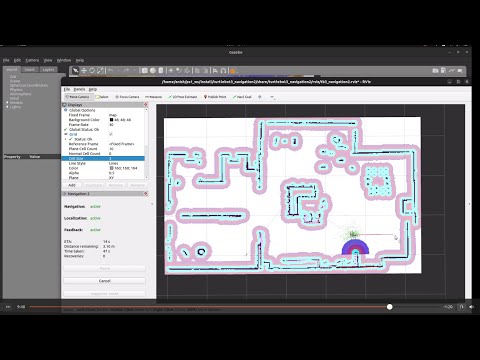
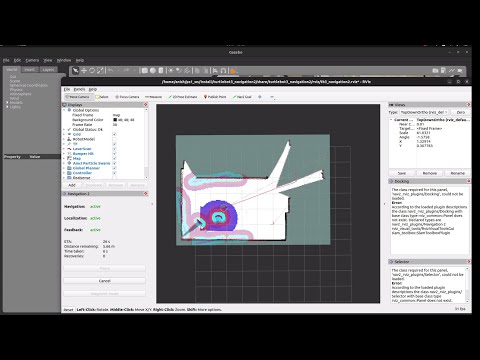
Watch TurtleBot3 autonomously explore, map, and navigate a custom house simulation!
This workspace provides TurtleBot3 simulation packages for ROS 2, including:
- Gazebo simulation
- Google Cartographer SLAM
- Custom world models
- Autonomous exploration with
explore_lite
✅ SLAM Mapping ✅ Autonomous Navigation (Nav2) ✅ Path Planning & Obstacle Avoidance ✅ AMCL Localization ✅ Realistic Custom House World ✅ RViz Visualization ✅ CycloneDDS for better ROS 2 performance ✅ Explore Lite for fully autonomous exploration of unknown spaces
ps1_ws/
├── src/
│   ├── turtlebot3/
│   │   └── turtlebot3_cartographer/
│   │       └── config/
│   │           └── turtlebot3_lds_2d.lua
│   └── turtlebot3_simulations/
│       └── turtlebot3_gazebo/
│           ├── worlds/
│           ├── models/
│           ├── launch/
│           └── CMakeLists.txt
└── README.md
-
OS: Ubuntu 22.04 LTS
-
ROS 2: Humble Hawksbill
-
Simulator: Gazebo 11+
-
Python: 3.10+
-
Required Packages:
turtlebot3cartographer_rosnavigation2
1️⃣ Clone the repository
cd ~/
git clone <repository-url> ps1_ws
cd ps1_ws
2️⃣ Add environment variables to ~/.bashrc
export TURTLEBOT3_MODEL=waffle
export RMW_IMPLEMENTATION=rmw_cyclonedx_cpp
export GAZEBO_MODEL_PATH=$GAZEBO_MODEL_PATH:~/ps1_ws/src/turtlebot3_simulations/turtlebot3_gazebo/models
export GAZEBO_RESOURCE_PATH=$GAZEBO_RESOURCE_PATH:~/ps1_ws/src
export GAZEBO_PLUGIN_PATH=$GAZEBO_PLUGIN_PATH:~/ps1_ws/src/turtlebot3_simulations/turtlebot3_gazebo/models
3️⃣ Reload your terminal
source ~/.bashrc4️⃣ Install dependencies
rosdep update
rosdep install --from-paths src --ignore-src -r -y
5️⃣ Build the workspace
colcon build --symlink-install
source install/setup.bashros2 launch turtlebot3_gazebo turtlebot3_house.launch.pyros2 launch turtlebot3_cartographer cartographer.launch.py use_sim_time:=Trueros2 run turtlebot3_teleop teleop_keyboardTeleop Controls:
w = forward | s = backward | a = left | d = right | x = stop | Space = emergency stop
ros2 run nav2_map_server map_saver_cli -f ~/mapros2 launch turtlebot3_navigation2 navigation2.launch.py use_sim_time:=True map:=$HOME/map.yamlros2 launch turtlebot3_autonomous_exploration autonomous_exploration.launch.pyLocation: src/turtlebot3/turtlebot3_cartographer/config/turtlebot3_lds_2d.lua
Key settings:
- 📌 Frames:
map→odom→imu_link - 📌 Sensor: LDS Laser Scan, range 0.12m–8.0m
- 📌 Submaps: 160 scans/submap @ 0.05m resolution
- 📌 Pose Graph: Loop closure every 90 nodes
Includes AWS RoboMaker residential models:
- Air Conditioners
- Furniture & rooms
- Realistic textures and collision meshes
- 2D Pose Estimate: Set initial pose
- 2D Nav Goal: Click to set a goal
- Monitor paths: Green (global) & Purple (local)
| Issue | Solution |
|---|---|
| Map frame missing | Use RViz 2D Pose Estimate |
| Goals fail | Set goals in free space only |
| Robot won't move | Verify use_sim_time & $TURTLEBOT3_MODEL |
| Missing models | Check $GAZEBO_MODEL_PATH |
| SLAM issues | Verify /scan topic & TF tree |
✅ Tune num_range_data, hit_probability, miss_probability in turtlebot3_lds_2d.lua
✅ Keep visual meshes simple for faster Gazebo performance
✅ Use CycloneDX for robust ROS 2 communication
- Add models:
models/folder →model.sdf+model.config+ meshes - Update CMake: Add new plugins or worlds as needed
- Test configs: Edit
.lua→ rebuild → test in sim
Apache License 2.0 — see LICENSE.
Special thanks to:
- ROBOTIS TurtleBot3
- Google Cartographer
- Nav2
- Gazebo simulation team
📚 References:
Author: Anish Kumar GitHub: @anishk85
✨ Enjoy mapping & navigating with your TurtleBot3!