
A complete radio receiver in a single file. No installation, no internet, no account: plug in an RTL-SDR stick, open the page, and listen.
OFFgrid-SDR is a full software-defined radio receiver that runs entirely in your web browser from one file. Put index.html on a USB pen drive with an RTL-SDR stick and an antenna, and you have a working shortwave, FM, airband, VHF/UHF and DRM and DAB digital radio receiver on almost any computer: no software to install, no administrator rights, no drivers to download on site (on most systems), and no internet connection needed.


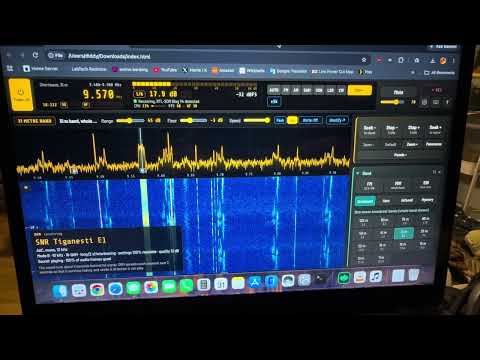
Looks good on a Chromebook in tablet mode:

The humble RTL-SDR stick needs some love. It has always been treated as an add-on: a cheap way into other SDR software, never the star of the show. I decided to change that, and build a receiver made for the RTL-SDR, that anyone can carry on a pen drive and use anywhere.
10 MHz overview → click a signal → 2.04 MHz view with a waterfall → zoom in, or pause and box a signal for a detailed replay → narrow it with A/B → save it for later.

- VDL2 decoding (requested feature): aircraft datalink, VDL Mode 2, the digital successor to ACARS, at 136.6–137 MHz. Every VDL2 channel in view is decoded at once, chosen from your locator (in Europe 136.675, 136.725, 136.775, 136.825, 136.875 and 136.975 MHz). ACARS messages in full (registration, flight, label, text), the rest summarised; each aircraft's country from its address (built in, so it works offline); channel buttons with counts to filter the list, and Messages only to hide acknowledgements. Checked frame for frame against dumpvdl2 on a real recording. Under More → Aircraft, and recognised by AUTO.
- Full screen / kiosk mode (requested feature): the button at the right of the top bar, or the F key. Should work for android devices.
- Five band tabs: FM · DAB · MW · SW · Air. DAB and airband have their own tabs, each opening your last channel there; SW keeps Broadcast, Ham and Mystery. On a narrow panel (a laptop or a tablet held sideways), the tabs wrap onto two rows.
- DAB station text and programme types: "now playing" and programme information under the playing station's details, with its programme type (News, Pop Music, Rock Music…).
- DAB station logos, from the multiplex's own picture service (SPI), as the BBC sends them: shown top right of the DAB box, and kept, so they appear at once on later visits. A first visit collects every station's logo within a few minutes, whichever station is playing. Hover over the multiplex's name to see how many have arrived, or whether the multiplex sends any at all (many UK commercial multiplexes don't: their radios fetch logos online).
- DAB SlideShow: pictures a station sends with its sound (common in mainland Europe) show in the logo's place: the latest one if there's no logo, or each new one for 10 seconds before the logo returns.
- DRM station text and pictures: the station's text message, and its SlideShow picture.
- More DAB stations play. A test matrix checked every combination the DAB standard allows: all 96 protection profiles, 51 kinds of MP2 (48 and 24 kHz, every bit rate and mode) and 16 kinds of DAB+ (AAC-LC, HE-AAC and HE-AAC v2, 32 and 48 kHz, 24 to 192 kbit/s). Now playing too: 24 kHz MP2 stations (on Sound Digital, Times Radio, Fix Radio and both Premier stations were silent), joint-stereo MP2 from encoders that switch modes frame by frame, the highest MP2 bit rates (320 and 384 kbit/s), and EEP 2-A at 8 kbit/s. Accented station names now show correctly ("RTS Première+").
- DAB fixes: a DAB+ station could go silent until retuned (also in 2.1); the receiver now re-locks by itself if its lock goes stale and rides through brief dips; damaged MP2 frames are dropped rather than played; the audio filters no longer apply to DAB (as with DRM); the waterfall's regular dip on DAB is gone.
- Faster, especially on slower computers: much less work in the DAB and DRM receivers (with no change to what they decode), no wasted demodulation in either mode, and a display that no longer makes the browser redo its layout every frame. On a five-year-old Lenovo Chromebook: AM from 38% to 24% of a processor core, DAB+ from about 60% to under 50%, and MP2 DAB's peaks from 110% to about 60%. Hover over the CPU figure to see where the time goes; the diagnostics log has the same breakdown.
- The More menu, grouped by kind: Voice, Digital radio, Aircraft, Ships, Ham digital, Pictures and Time signals.
- Selecting further back in the paused waterfall: drag a box towards the bottom edge and the waterfall scrolls back in time by itself; the box stays with the signal. ↑ ↓ move through the paused history, and a scroll bar on the right shows where you are.
- 108–118 MHz (aircraft navigation) now opens in AM, in 50 kHz steps.
- The demo: station text, logos and a SlideShow on "OFFgrid DAB" (12A), text and the OFFgrid-SDR logo on both DRM stations, and VDL2 aircraft on three channels.

Right mouse click to watch a DRM demo in a new page

-
2.1: DAB and DAB+ digital radio with sound, its stations, formats and signal, recognised by AUTO; DRM in xHE-AAC with sound; a DAB multiplex and an xHE-AAC station in the demo.
-
2.0: DRM digital radio with sound (AAC, with SBR and parametric stereo), its name, settings and signal quality, recognised by AUTO; 6 m and 4 m; a wider status line; fixes to the waterfall replay, RTTY's automatic reverse and noise reduction; and OFFgrid-SDR became free software under the GNU GPL.
-
1.9: APRS and AIS (ships on both marine channels at once); a first-time setup that sets your location, calibrates the stick and sets the clock from a time station; Clock details and a clock that learns your computer's drift; WSPR that corrects a clock a minute out; HF upconverters such as the Nooelec Ham It Up; each stick keeping its own correction; and the FM band for your country. 1.9.1 fixed the Ham It Up converter's offset not being applied correctly.
-
1.8: WSPR, Time signal (CHU, WWV, WWVH, RWM), deeper FT8/FT4 decoding, Heard and Band survey.
-
1.7: a much smarter AUTO, FT4, station countries and distances, keyboard shortcuts, memory markers and Check for updates.
-
1.6: the always-visible top bar and simpler layout, the OVL indicator, and FT8, ACARS, PSK and weather fax.
-
1.5: the AI voice cleaner, smart notch, logbook, frequency labels and new-signal alerts. 1.4: waterfall replay, AUTO and the first six decoders.
- Remote stations and expeditions: an Antarctic base, a ship or a field camp can listen to shortwave news, weather fax, NAVTEX and more, with no internet at all.
- Emergency and resilience kits: when the internet or the power grid is down, radio still works, and the whole receiver fits on a pen drive.
- Remote monitoring: leave it running for hours, recording, and saving weather fax charts automatically.
- Locked-down or shared computers: schools, libraries, work laptops and Chromebooks: it's just a page you open.
- Privacy: nothing leaves your computer. The page makes no network requests of its own, except two optional buttons when you click them: Identify (looks up the tuned frequency online) and Check for updates (looks on GitHub).
- Fully offline, FT8 included: the clock is set from time stations and the stations heard; countries come from a built-in table, and your location from 620 built-in cities.
- Demo mode for teaching in ham radio classes, clubs and meetups.
| An RTL-SDR stick | Tested with the RTL-SDR Blog V4 (recommended: shortwave with no adapter, and a 4.5 V bias-tee), the Blog V3 and the Nooelec NESDR SMArt v5. Other sticks with an R820T, R820T2 or R828D tuner should work; older E4000, FC0012, FC0013 and FC2580 sticks won't. |
| An antenna | The telescopic one is fine for FM. For medium wave and shortwave, tested with the AURSINC GA800 active loop and the YouLoop. For APRS and AIS, a VHF antenna mounted high. |
| An HF upconverter (optional) | Not needed with the V4. For other sticks, a converter such as the Ham It Up (Settings → Device → HF upconverter). |
| A browser with WebUSB | Chrome, Edge, or another Chromium-based browser. Tested on Windows 11, macOS Tahoe and ChromeOS (including a budget Lenovo 300e Chromebook). Firefox and Safari can run demo mode only. |
Sending a kit somewhere without internet: pack the stick, an antenna and a pen drive with index.html, README.txt (the offline guide), a settings backup with your memories and labels (Settings → Backup), Zadig for Windows, and a browser installer if needed. Run the setup first (Settings → Calibration → Run setup again), so the kit arrives with its location, calibration and clock set.
OFFgrid-SDR is one file, index.html; everything else here is documentation and licences.
- Download
index.html: click it in the file list above, then Download raw file. (For everything, use Code → Download ZIP.) - Open it in Chrome or Edge.
- Plug in the stick, press Power on, and choose the stick in the browser's USB chooser.
No stick yet? Open index.html?demo for demo mode: simulated stations showing every feature, from FM stereo with RDS, fading shortwave, SSB and Morse to weather fax, RTTY, NAVTEX, DSC, SSTV, PSK, FT8, FT4, WSPR, time stations, ACARS, APRS, AIS ships, Hellschreiber, two DRM stations (AAC and xHE-AAC), a DAB multiplex with two stations, and "The Buzzer".
Keeping up to date: press Check for updates in the help panel (?). To update, put the new index.html in place of the old one: your settings and memories are kept (export a backup first, to be safe).
- Windows: run Zadig, choose Options → List All Devices, select Bulk-In, Interface (Interface 0) (or RTL2838UHIDIR), choose WinUSB and click Replace Driver.
- macOS and Chromebooks: no configuration needed.
- Linux: stop the TV driver from claiming the stick, and give your user access to it:
Then unplug the stick and plug it back in. With Snap Chromium on Ubuntu, also run
echo 'blacklist dvb_usb_rtl28xxu' | sudo tee /etc/modprobe.d/rtl-sdr-blacklist.conf
sudo modprobe -r rtl2832_sdr dvb_usb_rtl28xxu        # or reboot
echo 'SUBSYSTEM=="usb", ATTRS{idVendor}=="0bda", ATTRS{idProduct}=="2838", MODE="0666"' | sudo tee /etc/udev/rules.d/20-rtlsdr.rules
sudo udevadm control --reload-rules && sudo udevadm trigger
sudo snap connect chromium:raw-usb.
Only one program can use the stick at a time, so close SDR#, SDR++, gqrx or rtl_tcp first.
- FM broadcast in stereo with RDS (the band follows your country); medium wave; and shortwave with a button for every broadcast band, 120 m to 11 m.
- Amateur bands: 160 m to 10 m, 6 m, 4 m (where allocated), 2 m and 70 cm.
- PMR446 channel by channel, and airband (its own Air tab) with 8.33 kHz channel steps and channel names.
- Mystery: famous unexplained stations such as The Buzzer (UVB-76) and The Pip.
- DAB (its own tab): every Band III channel, 5A to 13F, each opening in DAB mode on the multiplex.
- Any frequency from 100 kHz to 1766 MHz: type it in (
198k,162.025,1090M). - Each band remembers your last frequency, step and RF gain.
The same buttons on every band: AUTO · FM · AM · SAM · USB · LSB · CW · More ▾. FM is wide on the FM band and narrow elsewhere; SAM (synchronous AM) stops fading distortion, and SAM-U / SAM-L use one sideband to dodge interference. More holds the decoders. Modes that don't fit where you're tuned are greyed out, with the reason in the tooltip.

Switch AUTO on, and wherever you tune it listens for a couple of seconds, works out what the signal is, and switches to the right mode, tuned onto it:
| Where | What AUTO recognises |
|---|---|
| Shortwave | CW, RTTY, PSK31/63/125, NAVTEX, DSC, weather fax, SSTV, Hellschreiber, AM and SSB (judging USB or LSB from the voice, and tuning to within a few hertz) |
| FT8, FT4 and WSPR frequencies, time stations | FT8, FT4, WSPR and Time signal |
| VHF / UHF | Narrowband FM, airband AM, ACARS, APRS and AIS on their channels |
| FM broadcast band | Wideband FM |
| Long, medium and short wave | DRM: it switches to DRM, so the name and sound follow (and back to AM if no DRM signal is there after all) |
| VHF Band III (174–240 MHz) | DAB: anywhere in a multiplex, it moves to the channel's centre in DAB mode, so the station list follows (and back to narrowband FM if no multiplex is there) |
- DAB and DAB+: the multiplex's name and stations, to pick from; the sound of either kind (DAB+ in HE-AAC, DAB in MP2, at any bit rate), with each station's format, bit rate, channels and programme type, its "now playing" text, its logo or SlideShow pictures where the multiplex sends them, and the signal in dB.
- DRM: digital radio with sound (AAC and xHE-AAC), the station's name, language, text message, SlideShow pictures, settings and signal quality.
- RDS on FM: station name, programme type, RadioText and clock.
- Morse (CW), 4 to 60 words per minute, and RTTY, finding the shift, speed and mark/space by itself.
- NAVTEX maritime safety messages, and DSC ships' calls (distress in red).
- FT8 and FT4 with each station's country, distance and bearing, CQ filtering and sorting, and deeper decoding that finds weaker stations hidden under strong ones (◆).
- WSPR beacons down to about −28 dB, correcting a clock a minute or so out.
- Time signal from CHU, WWV, WWVH or RWM, with Find a time station, Set by hand and Clock details; Heard and Band survey for who you can hear and which bands are open.
- APRS positions, weather and messages, and AIS ships on both channels at once, each with distance and bearing.
- VDL2 aircraft datalink (VDL Mode 2): every channel in view at once, ACARS messages in full, the rest summarised, each aircraft's country.
- ACARS aircraft messages, SSTV pictures (Martin, Scottie, PD), PSK31/63/125, Hellschreiber, and weather fax charts saved as PNG.
 |
 |
 |
 |
 |
 |
 |
 |

Switch on the waterfall buffer (15, 30 or 60 seconds), press ⏸, and draw a box around any signal from the last few seconds: a replay window plays it on a loop, zoomed in. Give it its own mode and filters, retune within the box, decode Morse, read RDS or a DRM station's name, loop part of it with A/B, and Save it as MP3 plus a raw IQ file for SDR#, SDR++ and other SDR software.
- Spectrum and waterfall: click to tune, zoom up to 256×, memory markers, peak hold, averaging, new-signal alerts and a signal info popup.
- Panorama: up to 10 MHz at once, around you or across HF.
- OVL overload indicator, with one-click gain back-off and Undo; RF gain per band.
- Noise reduction, a noise blanker, a mains-hum filter, an auto notch, the AI voice cleaner (RNNoise) and the smart notch for whines.
- SSB filter widths and passband shift, AGC speed, squelch, Seek and Scan through your memories.
- Frequency calibration from a time station, and Identify (when online): a web search, Google's AI Mode, or the shortwave.live schedule for the tuned frequency.
- CPU and FPS figures, and Low-power mode for older or slower computers.
- Keyboard shortcuts: ← → step (Shift: seek), ↑ ↓ volume, PgUp/PgDn band, 0–9 type a frequency, A AUTO, Space pause, Z zero-beat, M mute, R record, + − zoom, K shortcuts, ? help.
Record to MP3 or WAV; 50 memories; frequency labels; a logbook that logs stations and decodes by itself and exports CSV; a settings backup for preparing a kit; and a diagnostics log to help track down problems. It keeps running in a background tab, recovers by itself if the stick is unplugged or resets, and decoders recover from broken audio.
- Browsers: WebUSB is only in Chromium-based browsers (Chrome, Edge, Opera…); Firefox and Safari can run demo mode only. One program at a time can use the stick.
- Tuners: R820T, R820T2 or R828D sticks only; older E4000, FC0012, FC0013 and FC2580 sticks won't work.
- DRM needs a good signal (about 10 dB for 16-QAM, 16 dB for 64-QAM); below that, the settings are read but not the name or sound. The few stations using unequal protection or hierarchical modulation aren't decoded yet.
- DAB needs a good signal: about 8 dB for the sound, while the station list comes through down to about 3 dB. An outdoor or loft VHF aerial helps a great deal. DAB mode runs the stick at 2.048 MHz, centred on the multiplex; Station logos and SlideShow pictures appear only where the multiplex broadcasts them, and other DAB data services aren't shown.
- RTL-SDR Blog V4 near 28.8 MHz: the stick's own 28.8 MHz clock shows as a strong spike there, so signals nearby (the top of 10 m, and CB around 27 MHz) can be affected. It stays with the antenna disconnected: it comes from the stick, not the band.
- Waterfall replay uses memory (about 123 MB for 30 seconds), so it's off by default, and a selection can't cross a retune.
- AUTO judges a couple of seconds of signal, so it can be wrong on very weak signals: choose the mode yourself if something sounds wrong.
- FT8 and FT4 reach slightly less deep than WSJT-X on a single weak station. Time signals: MSF and DCF77 are below the sticks' range, and a web page can't set the computer's own clock (Clock details shows how).
- Weather fax: the US National Weather Service has proposed closing its HF radiofax stations towards the end of 2026; they're marked in the station list.
- Smaller points: Morse may miss the first letter while locking on; the sound runs about 0.2 s behind the waterfall (Bluetooth adds more); reception is weaker below about 500 kHz; Panorama looks at one slice at a time; the AI voice cleaner is built for speech; DSC calls last only about 6 seconds; an HF upconverter's switch can only be reminded, not set; on direct-sampling sticks the RF gain has no effect on shortwave.
- Audio extensions need Allow access to file URLs (in
chrome://extensions) when OFFgrid-SDR is opened as a file. Background tabs: if Chrome's Memory Saver puts the tab to sleep, everything stops: add OFFgrid-SDR to "Always keep these sites active". - Slower computers: use Low-power mode; a very old or cheap machine may still struggle.

OFFgrid-SDR is free. If it's useful to you, you can buy me a coffee. ☕
OFFgrid-SDR is built on the work of others:
- @jtarrio/webrtlsdr by Jacobo Tarrío: the WebUSB driver for the RTL2832U and its tuners, including the RTL-SDR Blog V4's HF upconverter. Apache License 2.0. Several of OFFgrid-SDR's fixes to it have since been taken into the original. Version 3.0.7 includes fixes for problems found with OFFgrid-SDR: many thanks to Jacobo for his help.
- @jtarrio/signals by Jacobo Tarrío: the signal processing, including the FFT, filters, and the FM, AM, SAM (with its selectable sidebands), SSB and CW demodulators. Apache License 2.0.
- Google Radio Receiver, the original Chrome app these libraries grew from.
- Osmocom rtl-sdr, for working out how to use these USB TV sticks as software-defined radios.
- RTL-SDR Blog, for the V4 hardware and their open-source driver work.
- FAAD2 by M. Bakker, Nero AG, Ahead Software AG and contributors: the AAC decoder that plays DRM's and DAB+'s sound, built in with its DRM support and one small change of OFFgrid-SDR's, so that it also decodes DAB+ (whose fill elements a DRM-enabled build refused). GPL 2 or later. Its exact source, the change and the build script are in the
licenses/faad2folder. - libxaac by Ittiam Systems, part of the Android Open Source Project: the xHE-AAC decoder that plays DRM stations using xHE-AAC, built in unmodified with OFFgrid-SDR's small wrapper. Apache License 2.0. Its exact source and build script are in the
licenses/libxaacfolder. - pl_mpeg by Dominic Szablewski, whose MP2 decoder (based on kjmp2 by Martin J. Fiedler) plays the original DAB's sound, built in with three small changes for DAB (MPEG-2's 24 kHz frames accepted, as kjmp2 1.1 does, with their frame sync; and joint and plain stereo frames treated alike), with OFFgrid-SDR's small wrapper. MIT License. Its modified source, the changes, and the build script are in the
licenses/pl_mpegfolder. - welle.io by Albrecht Lohofener and contributors, the open-source DAB receiver: OFFgrid-SDR's DAB receiver uses its tables, from the DAB standard (ETSI EN 300 401), and follows its methods. GPL 2 or later.
- Dream, the open-source DRM receiver by Volker Fischer (Technische Universität Darmstadt) and contributors: OFFgrid-SDR's DRM receiver uses Dream's tables and follows its methods, from the DRM standard (ETSI ES 201 980). GPL 2 or later.
- The demo's DRM jingle is an original tune written for OFFgrid-SDR, encoded once with FAAC's DRM encoder, with four fixes made for it and offered back to the FAAC project; its xHE-AAC and DAB+ versions with libxaac's encoder, and its MP2 version with FFmpeg. None of these encoders is in OFFgrid-SDR: only what they made.
- ft8_lib by Kārlis Goba: the FT8 and FT4 protocol tables, error correction, message formats and decoding method that OFFgrid-SDR's FT8 and FT4 decoders follow. MIT License. FT8 and FT4 themselves were created by Joe Taylor, K1JT, and Steve Franke, K9AN (WSJT-X).
- acarsdec by Thierry Leconte, whose method of demodulating ACARS (MSK) OFFgrid-SDR's own ACARS decoder follows.
- dumpvdl2 by Tomasz Lemiech, and its libacars: OFFgrid-SDR's own VDL2 decoder follows the VDL Mode 2 standard (ICAO Annex 10, ETSI EN 301 841), with dumpvdl2 as the reference it was checked against, frame for frame, on a real recording. No dumpvdl2 code is used.
- Aircraft countries follow ICAO's allocation of 24-bit aircraft addresses (Annex 10, Volume III), as listed by tar1090; the table is built in, so it works offline.
- lamejs, the JavaScript port of the LAME MP3 encoder. LGPL.
- RNNoise by Jean-Marc Valin (Mozilla and the Xiph.Org Foundation), the neural network behind the AI voice cleaner (BSD licence), in the WebAssembly build @jitsi/rnnoise-wasm by Jitsi (Apache License 2.0).
- Barlow Semi Condensed and Share Tech Mono fonts. SIL Open Font License.
- esbuild, which bundles everything into a single file that runs offline.
- Zadig by Pete Batard, for installing the WinUSB driver on Windows.
- Shortwave.Live, the schedule database the Identify menu's "Shortwave radio schedule" opens.
- Frequencies for the Mystery stations come from Priyom.
- Callsign countries follow the ITU's allocation of callsign prefixes to countries.
- PSK31 and its Varicode alphabet were created by Peter Martinez, G3PLX.
- WSPR was created by Joe Taylor, K1JT. OFFgrid-SDR's WSPR decoder follows the published protocol, and was checked against the encoder in WsprryPi.
- The time-code formats are published by the National Research Council Canada (CHU) and NIST (WWV and WWVH); the WWV bit layout follows the NTP project's WWV driver.
- Taking decoded FT8 stations out of the signal to find weaker ones follows the method of WSJT-X by Joe Taylor, K1JT, and its developers.
- APRS was created by Bob Bruninga, WB4APR. OFFgrid-SDR's APRS decoder follows the published AX.25 and APRS specifications, and the Mic-E format published by TAPR.
- AIS follows the ITU's published standard (ITU-R M.1371). The decoder was checked against the example messages in Eric S. Raymond's AIVDM/AIVDO protocol decoding guide for gpsd.
OFFgrid-SDR is free software, under the GNU General Public License, version 3 or (at your option) any later version: you may use, share and change it, and changed versions you share must stay under the same licence. See the LICENSE file. The licence texts for the parts it includes are in the licenses folder, and the source and build scripts of the decoders built into it in compiled form, which the GPL asks to accompany them, are in the licenses/faad2, licenses/libxaac and licenses/pl_mpeg folders.
73!