


Nitro-powered geolocation for React Native apps
A native iOS/Android geolocation module for React Native 0.75+ apps using the
New Architecture and Nitro Modules. Start by replacing
@react-native-community/geolocation
with /compat, then move to the typed API when you are ready.
The current release line adds foreground web support through both the package
import and /compat, plus a native Background Location API for tracking, geofencing,
storage recovery, Headless JS, and HTTP sync.
In 2.0, Android foreground notifications accept custom actions: [{ id, title }].
Handle taps with onBackgroundEvent() or your Headless JS task using the
notificationAction event and its notificationAction.actionId payload.
In 2.0, watchProviderStatus(callback) also reports native authorization changes
through status.authorizationStatus (always, whenInUse, denied,
restricted, or undetermined). Clean up with unwatch(token).
- 🎯 Simple functional API — Direct function calls, no complex abstractions
- ⚡ JSI-powered performance — Direct native calls without Bridge overhead
- 🔁 Compat API — Drop-in compatible with the core native community API
- 🧹 Automatic cleanup — No manual subscription management
- 📱 Consistent behavior across iOS and Android
- 🛠️ DevTools Plugin — Mock locations with interactive map (Rozenite)
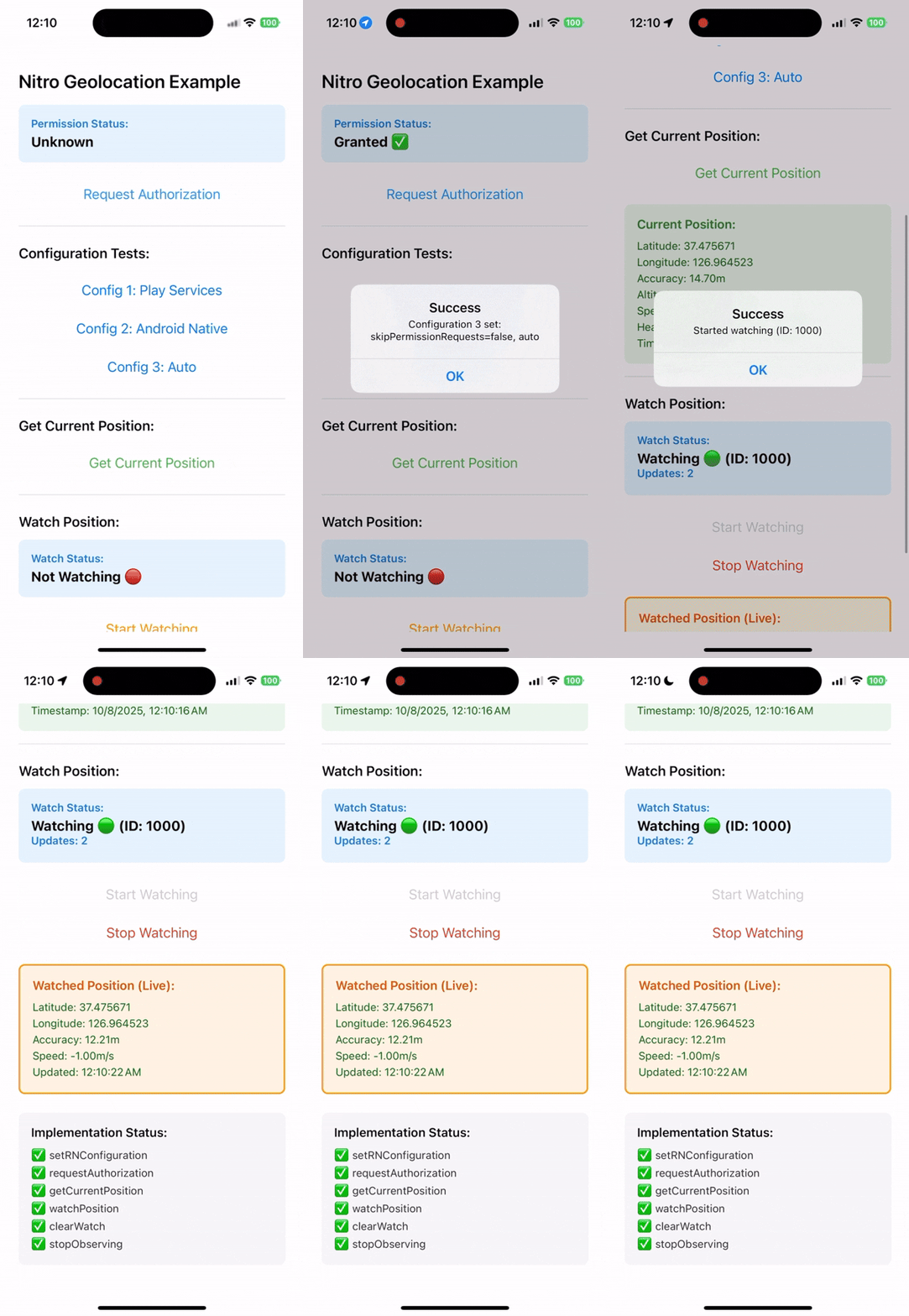
Full documentation available at: 👉 https://react-native-nitro-geolocation.pages.dev
| Use case | Recommendation |
|---|---|
| Bare React Native 0.75+ app with New Architecture/Nitro enabled | Use Nitro Geolocation |
Migrating from @react-native-community/geolocation |
Start with /compat |
| New Architecture / Nitro-based app | Recommended |
| Expo development build or custom native build | Supported with native setup |
| Expo managed app without native rebuild | Use expo-location |
| Web support required | Use the package import or /compat callback API |
| Full background tracking / geofencing | Use react-native-nitro-geolocation/background |
Web support is available for the package import and the /compat
subpath. Browser builds resolve both entries to implementations backed by
navigator.geolocation and do not load Nitro native bindings. Background
location remains native-only.
React Native Nitro Geolocation provides three public API surfaces to fit your needs:
Simple functional API with direct calls and a single hook for tracking:
import {
  setConfiguration,
  requestPermission,
  getCurrentPosition,
} from "react-native-nitro-geolocation";

setConfiguration({
  authorizationLevel: "whenInUse",
  locationProvider: "auto",
});

const status = await requestPermission();

if (status === "granted") {
  const position = await getCurrentPosition({
    accuracy: { android: "high", ios: "best" },
    timeout: 15_000,
  });
  console.log(position.metadata);
  // { source, age, quality, staleReason? }
}
Foreground responses include optional observational metadata for the
delivery source, age, horizontal-accuracy quality band, and stale reason. This
metadata never causes the library to reject a stale or low-accuracy position;
applications can apply their own policy. The /compat response shape is
unchanged.
See the API guide for watches, geocoding, heading, cached reads, Android settings, and iOS accuracy authorization.
Drop-in compatible with the core native
@react-native-community/geolocation API:
import Geolocation from "react-native-nitro-geolocation/compat";

Geolocation.getCurrentPosition(
  (position) => console.log(position),
  (error) => console.error(error),
  { enableHighAccuracy: true }
);

const watchId = Geolocation.watchPosition((position) => console.log(position));
Geolocation.clearWatch(watchId);
The /compat subpath covers the core native community API, including
setRNConfiguration, requestAuthorization, getCurrentPosition,
watchPosition, clearWatch, and stopObserving. It also has a browser entry
for callback-style foreground geolocation. See the
Compat API guide
for the full compatibility matrix and option notes.
Native background tracking, geofencing, activity events, Android Headless JS, HTTP sync, stored event recovery, and silent-delivery diagnosis should use the explicit background subpath.
Background location is native-only. Browser builds expose unsupported stubs so
web bundles can still import shared code safely. Start with the
Background Location guide
for permissions, start/stop, geofencing, storage recovery, and native sync.
Use diagnoseBackgroundLocation() from the same subpath to turn the raw
background status into actionable issues when delivery is silent.
# Install Nitro core and Geolocation module
yarn add react-native-nitro-modules react-native-nitro-geolocation@2.0.1

# or using npm
npm install react-native-nitro-modules react-native-nitro-geolocation@2.0.1
Rebuild your native app:
cd ios && bundle exec pod installUse pod install directly when your app does not check in a Gemfile.
React Native 0.87.x can use the experimental precompiled Swift Package Manager
path with Nitro Modules 0.37.1 and an app configuration helper. CocoaPods
remains the recommended production path; follow the
Swift Package Manager guide
exactly before converting an RN 0.87 app.
After configuring the native projects, inspect the installation without changing any files:
yarn nitro-geolocation doctorUse nitro-geolocation doctor --project apps/mobile --json for monorepos or
CI. Missing generated native folders are warnings; rerun it after native
generation to verify permissions and usage descriptions.
Expo development builds can opt into native permission generation by listing
react-native-nitro-geolocation in the app config plugins array. Installation
alone does not mutate native files. See the
Expo development build guide
for foreground and explicit background options.
Before release, review the project's privacy statement and the privacy and compliance guide for runtime data flows, permission disclosures, dependency inventory, SBOM, and scanner guidance.
Released npm builds try to use the matching GitHub Release prebuilts first:
Android downloads the release AAR and reuses its native .so files, while iOS
downloads the release XCFramework. If the prebuilt asset is unavailable, the
native source build is used automatically. Android prebuilts are used only when
the app's React Native and Nitro Modules major/minor versions match the release
asset build. To force source builds, set NITRO_GEOLOCATION_USE_PREBUILT=0.
Add permissions to your Info.plist:
<key>NSLocationWhenInUseUsageDescription</key>
<string>This app requires access to your location while it's in use.</string>
<key>NSLocationAlwaysAndWhenInUseUsageDescription</key>
<string>This app requires access to your location at all times.</string>
For background tracking, also enable the location background mode in
UIBackgroundModes.
Add permissions to AndroidManifest.xml:
<uses-permission android:name="android.permission.ACCESS_FINE_LOCATION" />
<uses-permission android:name="android.permission.ACCESS_COARSE_LOCATION" />
Optional (for background):
<uses-permission android:name="android.permission.ACCESS_BACKGROUND_LOCATION" />Full background tracking uses a foreground service on Android. Add the full
permission set from the Android background setup guide when using
react-native-nitro-geolocation/background, including Android 13+
POST_NOTIFICATIONS for the tracking notification.
Use the Rozenite DevTools plugin to mock locations during development with an interactive map. It works with the package import.
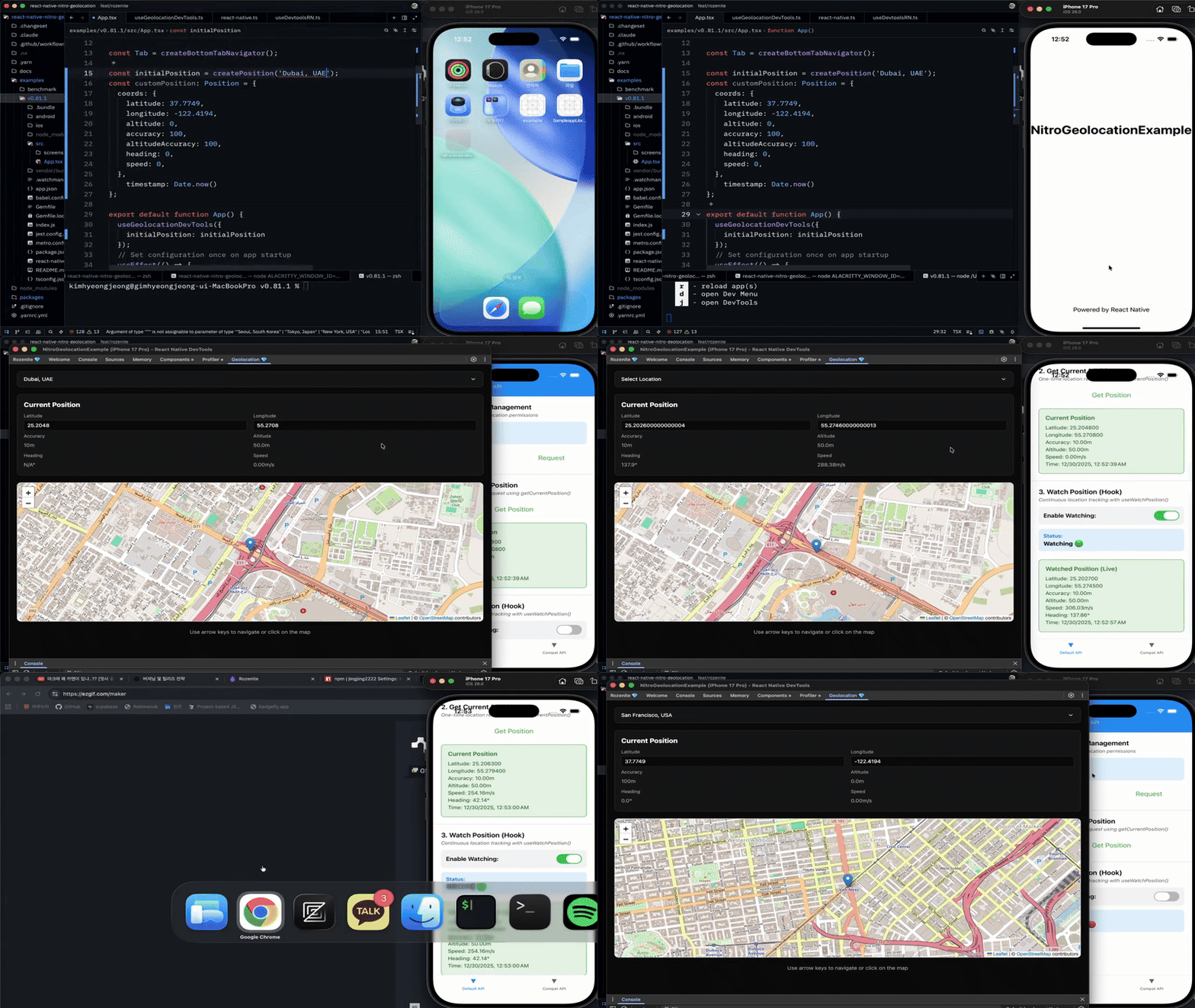
yarn add @react-native-nitro-geolocation/rozenite-pluginimport {
createPosition,
useGeolocationDevTools,
} from "@react-native-nitro-geolocation/rozenite-plugin";
function App() {
useGeolocationDevTools({
initialPosition: createPosition("Seoul, South Korea"),
});
return <RootNavigator />;
}The plugin requires Rozenite 2.2 or newer in your app. See the DevTools Plugin guide for setup, presets, troubleshooting, and the demo.
Use the docs site for the detailed flows:
- Quick Start - install, set native permissions, and read your first location.
- Swift Package Manager - RN 0.87 compatibility and migration gate.
- API - accuracy presets, watches, Android settings, cached reads, geocoding, heading, and iOS accuracy authorization.
- Compat API - callback compatibility and web behavior.
- Background Location - native background tracking, geofencing, storage recovery, Headless JS, HTTP sync, and delivery diagnosis.
- Migration Assistance - choose the community or service migration path.
- Expo Development Builds - use the package in Expo custom native builds.
- DevTools Plugin - mock locations during development.
- Introduction
- Quick Start Guide
- Swift Package Manager Guide
- API Reference
- Compat API Reference
- Migration Skills
- Community Migration
- Service Migration
- Expo Development Build Guide
- DevTools Plugin Guide
- Why Nitro Module?
- Benchmark Results
MIT License.