A GUI for power supplies, electronic loads and many other measurement instruments - built on top of the sigrok signal analysis library.




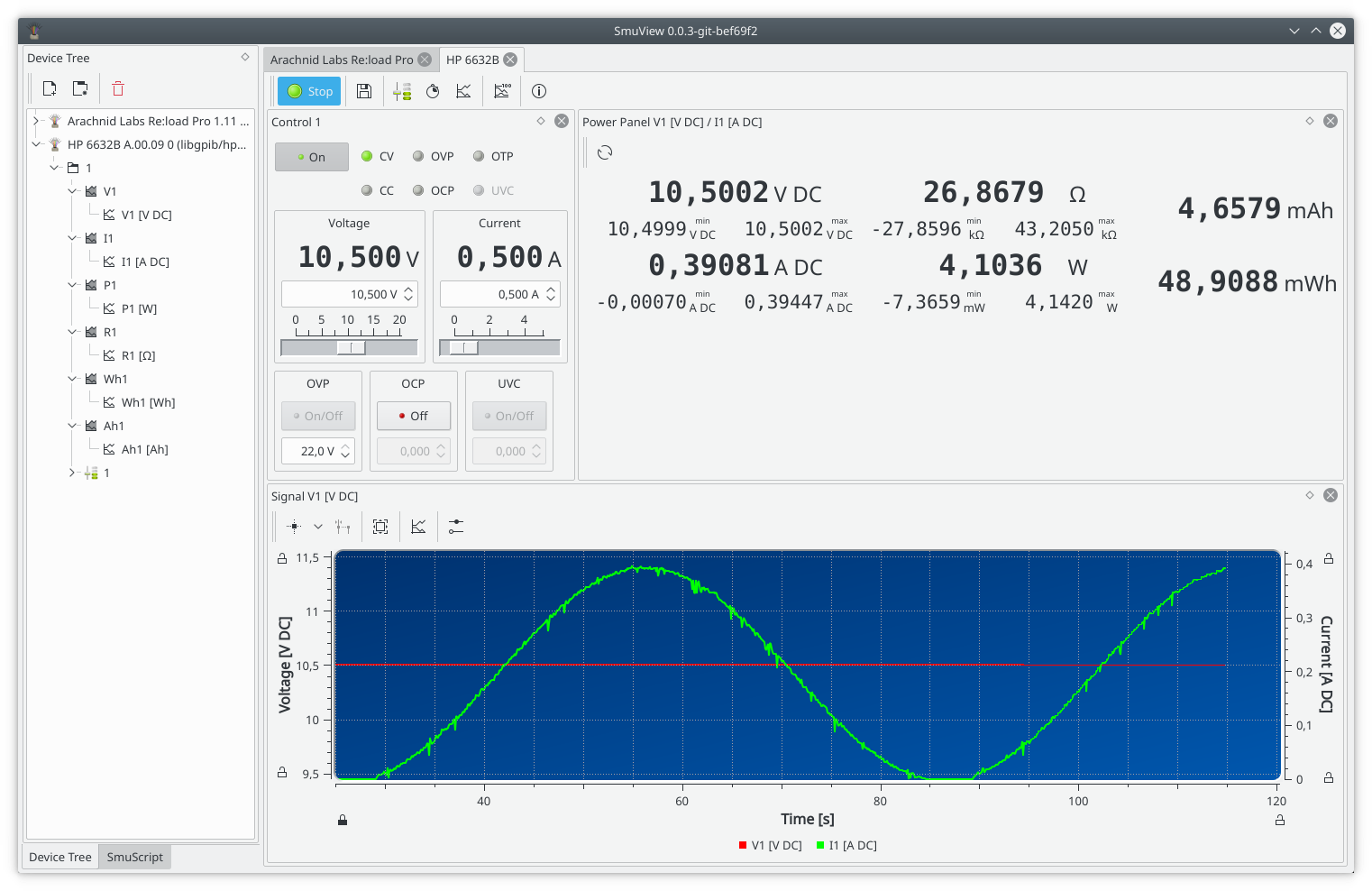
SmuView is a Qt-based graphical frontend for controlling, visualizing and logging data from lab instruments, like power supplies, electronic loads, multimeters, LCR meters and a wide range of other measurement devices. It can connect and drive multiple devices at once, combines their readings with math channels and automate measurement sequences with a built-in Python scripting engine.
SmuView is part of the sigrok project, which builds portable, free and open-source software for interfacing with measurement hardware. It reuses sigrok's device drivers via libsigrok, so any instrument supported by sigrok can be used with SmuView.
- Control multiple devices simultaneously
- Live data acquisition with configurable value panels, plots and data tables
- Math channels to transform or combine signals (e.g. calculating power, resistance or energy from voltage and current)
- Time and X/Y plots with markers, zooming and export to SVG, PDF, or PNG
- Export acquired data to CSV, with various timestamp and formatting options
- Per-device layouts that are saved and restored the next time you connect
- SmuScript: a Python scripting interface to automate complex or repetitive measurements and build custom UIs
- Embedded editor for SmuScript
- Sequence output to drive a device setting (e.g. a power supply's output voltage) through sine, triangle, sawtooth or custom waveforms
- Oscilloscopes can be controlled, but no data acquisition yet
See the user manual for a complete tour of the available functionality.
SmuView supports the sigrok drivers for:
- Power supplies: e.g. Rigol DP700/DP800, Korad KAxxxxP, HP 66xx series, Rohde & Schwarz HMC/HMP series and others
- Electronic loads: e.g. Arachnid Labs Re:load Pro, ZKETECH EBD-USB+, ITECH IT8500 series
- Measurement devices: Multimeters, LCR meters, sound level meters, thermometers, hygrometers, anemometers, light meters, energy meters, tachometers and scales
- Oscilloscopes: e.g. Agilent, Hantek, Rigol and others (only support for controlling device, no data acquisition at the moment)
Oscilloscopes, logic analyzers, and mixed-signal devices are not (fully) supported yet (use PulseView or sigrok-cli for those); oscilloscope support is on the roadmap.
The full, current device list is in the sigrok wiki: Supported hardware and the SmuView wiki page.
Note
If a controllable device connects and acquires data but misbehaves as soon as you change a setting (e.g. output voltage), its libsigrok driver is likely missing a required mutex. Please report this on GitHub.
Pre-built packages are available for Linux, Windows, and macOS. The continuous release has the latest development snapshot and is the recommended download. A tagged stable release is also available.
- Linux (amd64 / arm64): AppImage, no installation required:
chmod u+x SmuView-x86_64.AppImage
./SmuView-x86_64.AppImage
- Windows (64-bit): Self-contained installer (Windows 8 or later)
- macOS (arm64): DMG image (macOS 15 or later)
Downloads: Continuous release · GitHub Releases
SmuView depends on libsigrok and a Qt-based toolchain. Detailed, platform-specific build instructions are available on the sigrok wiki:
or in the manual:
git clone https://github.com/knarfS/smuview.git
cd smuview
mkdir build && cd build
cmake ..
make- User manual (HTML) / PDF
- SmuScript Python bindings API
- SmuView wiki page on sigrok.org
import smuview
import time

# Connect a device.
dmm_dev = Session.connect_device("hp-3478a:conn=libgpib/hp3478a")[0]
time.sleep(1)  # give the device time to create its signals

# Read the last sample from channel P1.
sample = dmm_dev.channels()["P1"].actual_signal().get_last_sample(True)
print(sample)

# Open the default tab for the device in the UI.
UiProxy.add_device_tab(dmm_dev)
More examples are available in the smuscript/ folder of the repository.
sigrok is a portable, cross-platform, free and open-source signal analysis software suite covering logic analyzers, oscilloscopes, multimeters and many other device classes. SmuView is one of several sigrok-based frontends, alongside PulseView for logic analyzers and scopes, as well as sigrok-cli for the command line.
- Issues / feature requests: GitHub Issues
- Mailing list: sigrok-devel
- IRC:
#sigrokon Libera.Chat
Pull requests are welcome. If you'd like to add support for a new instrument, note that device drivers live in libsigrok, not in SmuView itself - see the sigrok driver development resources to get started, then open an issue here to hook it up in the UI.
SmuView is under active development. Current roadmap items include oscilloscope support and import/export of user-device layouts - see the wiki roadmap for details.
SmuView is licensed under the GNU General Public License, version 3 or later (GPLv3+). Some individual source files are licensed under GPLv2+ or GPLv3+ specifically, but the project as a whole is distributed under GPLv3+ terms. See COPYING for the full license text and individual source files for their respective copyright holders.
Bundled assets have their own licenses:
- pybind11 (BSD-style license)
- QCodeEditor (MIT License)
- QtFindReplaceDialog (LGPLv2.1 license)
- Icons:
- Oxygen Icon Theme (LGPLv3 license);
icons/information.svgby Bobarino (GFDL 1.2 or later / CC-BY-SA 3.0)
- Font: DejaVu Sans Mono (Public Domain / Bitstream Vera Fonts / Arev Fonts copyright)
