
- This project implements a spoken digit classification system using a Multi-Layer Perceptron (MLP) neural network trained on spectrograms of audio recordings. The model is deployed via Flask and containerized with Docker.
- To read the full documenation of this project made by people contributed to this project (FRENCH) , here's the Link
🔗 Live Demo: Hugging Face Space
- Goal: Classify spoken digits (
0to9) from audio recordings - Feature Extraction: Generate spectrograms from audio to obtain numerical representations
- Model Type: Multi-Layer Perceptron (MLP) — No CNN used
- Frameworks:
TensorFlow/Kerasfor training,Flaskfor serving predictions - Training Environment: Google Colab GPU
- Model Size: ~200 MB (handled using Git LFS)
.
├── Flask/                                       # Flask app with prediction endpoint & UI
│ ├── static/                                    # CSS, JS, and static files
│ ├── templates/                                 # HTML templates for web UI
│ ├── app.py                                     # Main Flask application
│ ├── predict.py                                 # Prediction logic
│ ├── test.py                                    # Local testing script
│ ├── requirements.txt                           # Python dependencies
│ ├── words.npz                                  # Vocabulary/label encoder
│ ├── recording.wav                              # Example input audio
│ ├── last_model_e20_acc78_.keras                # Trained MLP model
│ └── ...
├── data/                                        # Dataset (if provided)
├── models_last/                                 # Model storage
├── .ipynb_checkpoints/                          # Jupyter checkpoints
├── .gitattributes                               # Git LFS settings
├── .gitignore                                   # Git ignore rules
├── README.md                                    # Project documentation
├── audio_spctrogram.ipynb                       # Notebook for spectrogram generation
├── full_project.ipynb                           # Complete training + evaluation pipeline
└── model_evaluation.ipynb                       # Metrics & plots
A spectrogram is a visual representation of audio that shows how the frequency content of a signal changes over time. Think of it as a "musical fingerprint" that transforms sound waves into images that machines can understand. Link above to documntation to know more
Why Spectrograms Work for Digit Classification:
- Each spoken digit has unique frequency patterns
- Different people saying the same digit share similar spectral signatures
- Time-frequency representation captures both temporal and tonal characteristics
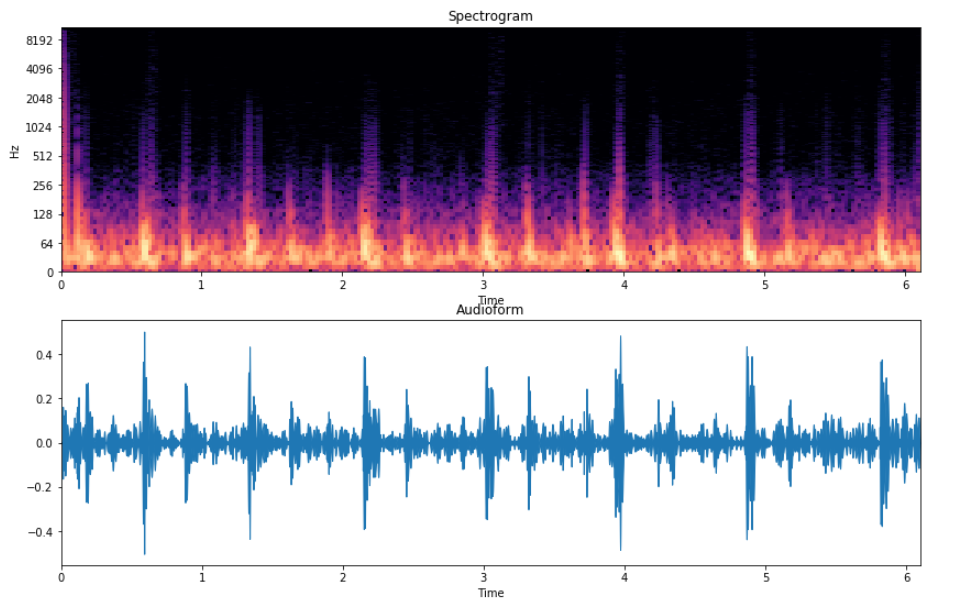
- Sample Rate: 22,050 Hz (audio resampling)
- Window Function: Hann window for STFT
- Frequency Range: 0 to ~11 kHz
- Time Resolution: Variable based on audio length
- Color Scale: Amplitude in decibels (dB)
This architecture was selected as the optimal configuration after experimenting ( A LOT ) multiple different architectures, layer configurations, and hyperparameters:
- Input Layer: Flattened spectrogram features
- Hidden Layer 1: 512 neurons (ReLU + Dropout 0.3)
- Hidden Layer 2: 256 neurons (ReLU + Dropout 0.3)
- Hidden Layer 3: 128 neurons (ReLU + Dropout 0.2)
- Output Layer: 10 neurons (Softmax) for digits 0–9
Training Configuration:
- Optimizer: Adam (lr=0.001)
- Loss: Categorical Crossentropy
- Batch Size: 32
- Epochs: 20
- Environment: Google Colab GPU (NVIDIA Tesla T4)
Key Metrics:
- Accuracy: 79%
- AUC Score: 0.95–0.97 across classes
- Inference Time: ~50ms per prediction
- Best Performing Digits: 5, 2, 4 (F1-Score > 0.84)
- Challenging Digits: 3, 6, 7 (confused due to phonetic similarity)
- Model Size: Optimized for web deployment (~200MB)
- Inference Speed: Real-time capable (~50ms per prediction
clone the repository in huggingFace Link you may have to use Git Large File Storage (LFS)
docker build -t audio-digits .docker run -p 7860:7860 audio-digitsOpen your browser and navigate to:
http://localhost:7860
Ensure you have Python 3.10 installed on your system. clone the repository in huggingFace Link
pip install -r requirements.txtpython app.pyOpen your browser and navigate to:
http://localhost:5000
- Input: WAV/MP3 audio file
- Resampling: Convert to 22,050 Hz using Librosa
- Spectrogram Generation: STFT → Amplitude to dB conversion
- Normalization: Z-score normalization
- Prediction: Forward pass through trained MLP
- Python: 3.10
- Memory: ~500MB RAM during inference
- Storage: ~200MB for model files
- Audio Formats: WAV, MP3, OGG supported
- TensorFlow 2.13.0
- Librosa 0.10.1
- Flask 2.3.3
- NumPy 1.24.3
- Matplotlib 3.7.2
- Scikit-learn 1.3.0
- FFmpeg (audio processing)
- PortAudio (audio I/O)
MIT License © 2025
⭐ Star this project if it helped you!!