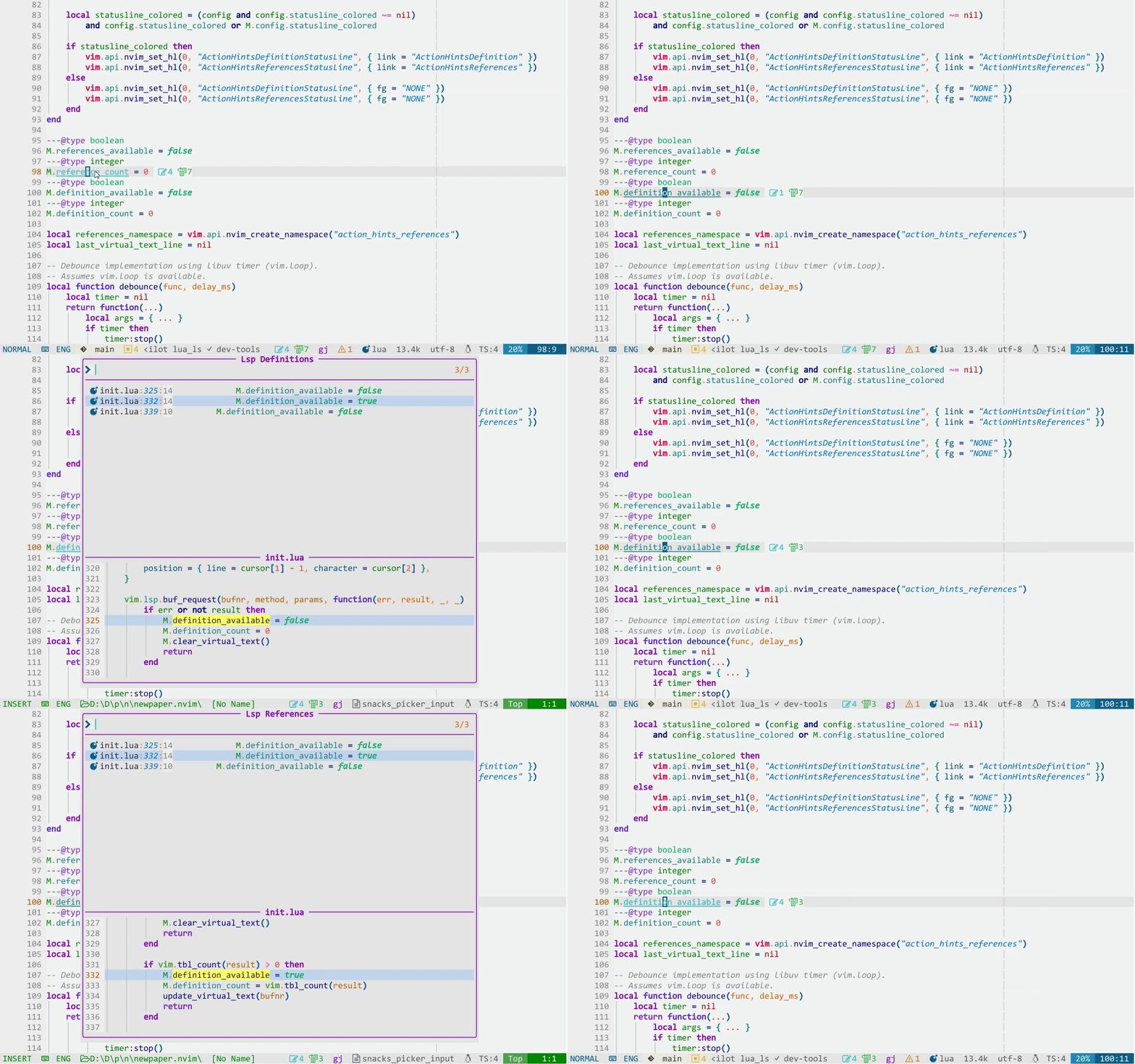
Tip
Just install the newpaper.nvim colorscheme so that it is like in the screenshot
- 🔍 Shows available actions for the word under the cursor (definition / references).
- 🖼️ Can display indicators inline as virtual text (e.g. next to the current line).
- 💬 Can output a statusline fragment (compatible with statusline and lualine).
- ⚙️ Configurable templates and colors for definition/references indicators.
- ⛔ Ignored patterns support (filetypes, filename substrings or Lua patterns).
- 🔒 Works only when LSP methods textDocument/definition and textDocument/references are available.
- ⚡️ Minimal and lightweight — forked to simplify and adapt behavior.
Install via your favorite package manager:
{
    "yorik1984/action-hints.nvim",
    opts = {}
},---@class ActionHintsTemplateEntry
---@field text string
---@field color string|function|nil
---@field link string|nil
---@class ActionHintsConfigTemplate
---@field definition ActionHintsTemplateEntry
---@field references ActionHintsTemplateEntry
---@class ActionHintsConfig
---@field template ActionHintsConfigTemplate
---@field ignored string[]
---@field use_virtual_text boolean
---@field statusline_colored boolean
---@type ActionHintsConfig
{
template = {
definition = {
text = " ⊛%s",
color = require("action-hints").get_fg_color("LspReferenceWrite"),
link = "Typedef",
},
references = {
text = " ↱%s",
color = require("action-hints").get_fg_color("LspReferenceRead"),
link = "Type",
},
},
ignored = {},
use_virtual_text = true,
statusline_colored = true,
}- 🎨 Priority: if
template.*.coloris set → plugin applies that hex asfg. - 🔗 Otherwise → plugin applies
{ link = template.*.link }(default config always provides a link). - 🧩 Function support:
template.*.colorcan be a function that returns a hex color. This allows dynamically fetching colors from existing highlight groups. - 🔄 Fallback chain:
- If
coloris a function → call it to get hex - If function returns a valid hex → use it as
fg - If function returns
nilorcoloris not set → uselink
- If
- 🎯 Default configuration uses functions to fetch colors from built-in LSP highlight groups:
definition.colortriesLspReferenceWrite(definition highlight)references.colortriesLspReferenceRead(reference highlight)- If these groups don't exist, falls back to
TypedefandTypelinks
- ⚡ No extra heuristics: color (function result) wins, otherwise link.
template.definition/template.referencestext— format for virtual text.color—"#rrggbb", function, ornil. If set to a string, this fixed color is used. If set to a function, it is called to obtain a hex color (useful for dynamic colors from existing highlight groups). If function returnsnilor color is not set, falls back tolink.link— hl group name (e.g."Typedef","Type") used whencolorisnilor function returnsnil.
ignored— list of patterns/items to ignore.use_virtual_text— show virtual text (true/false).statusline_colored— if true, statusline groups link to main plugin groups.
- Force a color:
template.definition.color = "#AF0000"→ plugin appliesfg = "#AF0000"and respects it across theme changes.
{
    template = {
        definition = {
            color = "#AF0000",
        },
        references = {
            -- use built-in function to extract fg color from any group
            color = require("action-hints").get_fg_color("Type"),
        },
    },
}- Theme-controlled (recommended default):
template.definition.color = nil; template.definition.link = "Typedef"→ plugin links to"Typedef", so the colorscheme decides the color.
{
    template = {
        definition = {
            link = "Typedef",
        },
        references = {
            link = "Type",
        },
    },
}- Ignored:
-
ignoredfield accepts Lua patterns (not shell globs). Patterns are matched against file paths (relative or absolute) — use^/$anchors,.and*for "any char" / "repeat", and escape special characters with%(e.g..→%.). -
%.min%.js$— ignore files ending with.min.js(.must be escaped) -
_spec%.lua$— ignore Lua spec files ending with_spec.lua -
Lua pattern special chars include:
^$()%.[]*+-?. Prefix with%to match them literally. -
Patterns are case‑sensitive by default on POSIX filesystems.
-
- ✅ Ship defaults with
color = nilso themes control appearance; let users override withcolorwhen they want a fixed hue. - 🖨️ When providing explicit colors, consider adding
ctermfgfor terminal compatibility. - 🔍 Ensure linked groups exist in common themes (Typedef/Type are commonly present).
Lualine and other statusline frameworks will respect these markers and apply the highlight groups accordingly. As a lualine component:
{
    "nvim-lualine/lualine.nvim",
    dependencies = {
        {
            "yorik1984/action-hints.nvim",
            opts = {},
        },
    },
    opts = {
        sections = {
            lualine_x = { require("action-hints").statusline },
        },
        -- other settings
        ...
    },
}| Command | Description |
|---|---|
:ChangeActionHintsStat |
Change the global plugin state |
Optionally add user keymap:
vim.keymap.set("n", "<leader>aa", ":ChangeActionHintsStat<CR>", { noremap = true })Quick reference for the highlight groups used by the plugin.
-
🟣
ActionHintsDefinition- Purpose: rendering "definition" indicators (Go to Definition).
- Source: uses
M.config.template.definition.colorif set; otherwise falls back tolink = M.config.template.definition.link(default"Typedef"). - Applied to: virtual text (virt_text).
-
🔵
ActionHintsReferences- Purpose: rendering "references" indicators (Go to Reference(s)).
- Source: uses
M.config.template.references.colorif set; otherwise falls back tolink = M.config.template.references.link(default"Type"). - Applied to: virtual text (virt_text).
-
🟢
ActionHintsDefinitionStatusLine- Purpose: statusline-specific styling for definition markers.
- Behavior: when
statusline_colored = truethis group is linked toActionHintsDefinition; otherwise it is set toNONE(no color). - Usage: use
%#ActionHintsDefinitionStatusLine#in statusline segments.
-
🟡
ActionHintsReferencesStatusLine- Purpose: statusline-specific styling for references markers.
- Behavior: when
statusline_colored = truethis group is linked toActionHintsReferences; otherwise it is set toNONE. - Usage: use
%#ActionHintsReferencesStatusLine#in statusline segments.
Note
- ⚡ Priority rule:
color(if provided) overrideslink. Ifcolor == nilthe plugin uses the configuredlinkso the active colorscheme controls appearance. - 🖥️ Statusline groups exist to keep statusline visuals consistent and optionally decoupled from virt_text groups.
- Set highlight groups directly (hex color):
vim.api.nvim_set_hl(0, "ActionHintsDefinition", { fg = "#AF0000" })
vim.api.nvim_set_hl(0, "ActionHintsReferences", { fg = "#007200" })- Link to an existing highlight group:
vim.api.nvim_set_hl(0, "ActionHintsDefinition", { link = "Typedef" })
vim.api.nvim_set_hl(0, "ActionHintsReferences", { link = "Type" })- Foreground color from existing highlight group:
vim.api.nvim_set_hl(0, "ActionHintsDefinition", { fg = require("action-hints").get_fg_color("Typedef") })
vim.api.nvim_set_hl(0, "ActionHintsReferences", { fg = require("action-hints").get_fg_color("Type") })
Note
By default, the plugin automatically fetches colors from LSP highlight groups:
- Definitions use
LspReferenceWrite - References use
LspReferenceRead
No additional configuration is needed — the plugin handles this automatically. The icons will inherit the same colors as LSP highlights.
- doc-highlight.nvim – A neovim plugin for LSP Document Highlight