GPU Setup
🌐 Language: English | Français
dictee runs ASR and diarization inference on NVIDIA GPUs via ONNX Runtime + CUDA 12. GPU inference is 5–20× faster than CPU depending on model and audio length. Canary built-in translation and real-time Diarization essentially require a GPU.
This page walks through CUDA prerequisites per distribution, the driver/toolkit/cuDNN matrix, the GPU detection logic dictee uses, and CPU fallback behavior when detection fails.
- Supported hardware
- Requirements overview
- NVIDIA driver check
- Distribution-specific setup
- CUDA / cuDNN bundled libraries
- Detection logic
- CPU fallback
- AMD ROCm / Intel oneAPI
- Troubleshooting
| GPU family | Compute capability | Supported |
|---|---|---|
| NVIDIA Ampere (RTX 3000, A100) | 8.0–8.6 | ✅ Fully supported |
| NVIDIA Ada Lovelace (RTX 4000, L40) | 8.9 | ✅ Fully supported |
| NVIDIA Turing (RTX 2000, T4) | 7.5 | ✅ Fully supported |
| NVIDIA Volta (V100) | 7.0 | ✅ Supported |
| NVIDIA Pascal (GTX 10xx, P100) | 6.0–6.1 | ✅ Supported (minimum) |
| NVIDIA Maxwell (GTX 9xx) | 5.0–5.2 | ❌ Too old for CUDA 12 |
| NVIDIA Blackwell (RTX 5000) | 10.0+ | ⚠ Newer drivers required |
| AMD GPUs | — | ❌ CPU fallback only |
| Intel Arc / Xe | — | ❌ CPU fallback only (OpenVINO planned) |
Minimum VRAM: 4 GB for Vosk/Whisper-tiny, 6 GB for Parakeet-TDT (short audio), 8 GB for Canary-1B, 12+ GB for long audio + diarization. See Parakeet-TDT-Deep-Dive for the full VRAM / duration matrix.
| Component | Minimum | Recommended | Reason |
|---|---|---|---|
| NVIDIA driver | 535.x | 550+ | CUDA 12 compatibility |
| CUDA runtime | 12.0 | 12.4+ | Bundled inside package via pip venv (no system install) |
| cuDNN | 9.x | 9.5+ | Required for libcudnn9-cuda-12
|
| Kernel | 5.15+ | 6.1+ | DKMS module compatibility |
| glibc | 2.35+ | 2.38+ | Ubuntu 22.04 / Fedora 40 baseline |
Since v1.3 the CUDA package bundles CUDA runtime libraries internally (via a pip venv) — you only need the NVIDIA driver and libcudnn9 on the system. No need to install cuda-toolkit or configure LD_LIBRARY_PATH manually.
Before installing dictee-cuda, verify the driver:
nvidia-smi
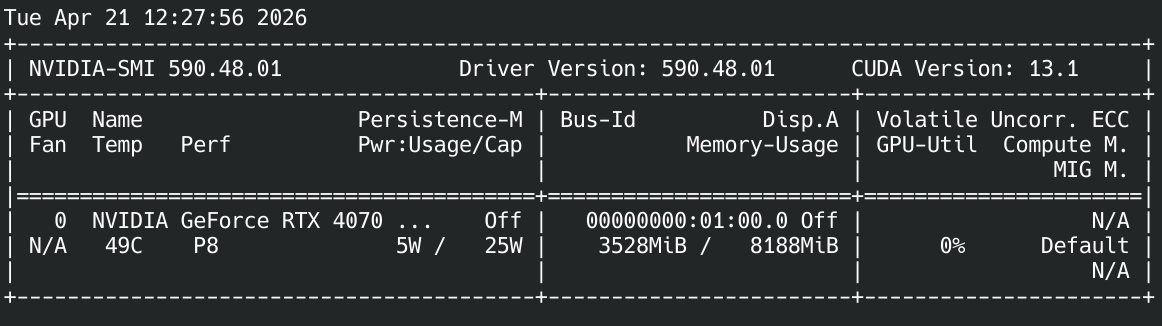
If nvidia-smi is missing or reports "no devices found", install the proprietary NVIDIA driver via your distribution's usual tooling (see the per-distro sections below).
# Driver (if not already installed)
sudo ubuntu-drivers install nvidia-driver-550

# Add NVIDIA CUDA repository for libcudnn9
wget https://developer.download.nvidia.com/compute/cuda/repos/ubuntu2404/x86_64/cuda-keyring_1.1-1_all.deb
sudo dpkg -i cuda-keyring_1.1-1_all.deb
sudo apt update

# Install dictee CUDA package
sudo apt install ./dictee-cuda_1.3.1_amd64.debSame as 24.04 but swap ubuntu2404 → ubuntu2204 in the CUDA keyring URL:
wget https://developer.download.nvidia.com/compute/cuda/repos/ubuntu2204/x86_64/cuda-keyring_1.1-1_all.deb# Driver via non-free-firmware
sudo apt install nvidia-driver linux-headers-amd64
# CUDA repo (Debian 12)
wget https://developer.download.nvidia.com/compute/cuda/repos/debian12/x86_64/cuda-keyring_1.1-1_all.deb
sudo dpkg -i cuda-keyring_1.1-1_all.deb
sudo apt update
sudo apt install ./dictee-cuda_1.3.1_amd64.deb# Driver via RPM Fusion
sudo dnf install akmod-nvidia xorg-x11-drv-nvidia-cuda
# CUDA repo (Fedora 41 example; swap for your version)
sudo dnf config-manager addrepo --from-repofile=\
https://developer.download.nvidia.com/compute/cuda/repos/fedora41/x86_64/cuda-fedora41.repo
sudo dnf install ./dictee-cuda-1.3.1-1.x86_64.rpmOn Fedora, wait ~5 minutes after akmod installation for the kernel module to build, then reboot before running
nvidia-smi.
Arch ships CUDA and cuDNN in the official extra repo:
sudo pacman -S nvidia nvidia-utils cuda cudnn

# AUR build with CUDA
git clone https://github.com/rcspam/dictee.git
cd dictee
PKGBUILD_FLAGS="cuda,sortformer" makepkg -siSince v1.3, the CUDA package bundles CUDA runtime libraries via pip venv at /usr/lib/dictee/venv-cuda/lib/python3.x/site-packages/nvidia/:
libcublas.so.12libcublasLt.so.12libcudart.so.12libcufft.so.11libcurand.so.10libcusolver.so.11libcusparse.so.12libonnxruntime_providers_cuda.so
The transcribe-daemon binary sets LD_LIBRARY_PATH and ORT_DYLIB_PATH at startup to find these bundled libs. This means:
- ✅ No
LD_LIBRARY_PATHpollution in your shell - ✅ No conflict with system CUDA (if you have
cuda-toolkitinstalled for another project) - ✅ No need to install
cuda-cudart-12/libcublas-12system-wide
The only system-level dependency is cuDNN 9 (libcudnn9-cuda-12 on Debian/Ubuntu, libcudnn9 on Fedora), pulled from the NVIDIA CUDA repo.
dictee checks GPU availability in three places:
-
At install time —
install.shrunsnvidia-smiand prompts CPU vs CUDA variant choice. -
At daemon startup —
transcribe-daemonqueriesort::ExecutionProvider::CUDAavailability before loading the model. If CUDA init fails (missing driver, wrong CUDA version, cuDNN mismatch), it falls back to CPU with a warning in the journal. - At transcription time — if GPU runs out of memory mid-transcription (OOM on long audio), the error is propagated to the user with a workaround hint.
Check the current backend via:
journalctl --user -u dictee -n 20 | grep -iE "cuda|gpu|cpu"Expected output after CUDA init success:
dictee[12345]: Loading Parakeet-TDT on CUDA execution provider
dictee[12345]: GPU: NVIDIA GeForce RTX 4070 Laptop GPU (8 GB)
If CUDA init fails, dictee logs a warning and continues on CPU:
dictee[12345]: CUDA init failed: libcudnn.so.9: cannot open shared object file
dictee[12345]: Falling back to CPU execution provider
CPU inference is functional but slower (Parakeet-TDT ~0.8 s warm latency on CPU vs ~0.16 s on GPU for a 5-second utterance). Diarization + transcription on CPU works for short files but is impractical for meetings.
Force CPU (bypass detection):
sudo systemctl --user stop dictee
DICTEE_FORCE_CPU=1 dictee-switch-backend asr parakeet
sudo systemctl --user start dicteeNot currently supported. ONNX Runtime has experimental execution providers for both, but:
-
ROCm — requires rebuilding ONNX Runtime from source with
--use_rocm. Not shipped in pre-built packages. - OpenVINO (Intel) — similar story. Community contributions to test and package an Intel variant are welcome.
AMD / Intel GPU users: install the CPU variant and expect ~1 s warm latency for short utterances.
See Troubleshooting for the full list. Common issues:
-
"GPU not detected — silent CPU fallback" → Check
nvidia-smioutput + kernel log (dmesg | grep -i nvidia). - "CUDA OOM on long audio" → Split the file into ≤ 10-min chunks, or use CPU backend. See Parakeet-TDT-Deep-Dive.
-
"cuBLAS / cuDNN version mismatch" → The CUDA package bundles cuBLAS via pip venv. Make sure
libcudnn9-cuda-12(Ubuntu/Debian) orlibcudnn9(Fedora) is installed from the NVIDIA CUDA repo. -
Driver too old → Upgrade to NVIDIA driver 535+. On Ubuntu:
sudo ubuntu-drivers install nvidia-driver-550.
- ASR-Backends — which backend benefits most from GPU
- Parakeet-TDT-Deep-Dive — VRAM breakdown, duration limits
- Diarization — speaker diarization VRAM requirements
- Troubleshooting — GPU-specific issues